Kotlin Multiplatform for Unity: Share Android & iOS Code
You’ve built Unity games that run on both Android and iOS. The game logic works perfectly across platforms because Unity handles that. But what about the native code surrounding your game?
Player authentication, analytics, cloud saves, in-app purchases. These systems live outside Unity, written separately for each platform. You write the iOS version in Swift, then write it again in Kotlin for Android. Same logic, two codebases.
Kotlin Multiplatform changes this. You write your business logic once and share it between Android and iOS. No bridge plugins, no compromises on native UI, no performance overhead.
This guide shows you how.
What Unity Developers Need to Know
Unity already solves cross-platform for game logic. You write C# once and it runs everywhere. Kotlin Multiplatform (KMP) does something similar but for native mobile code.
What Unity does for game code, KMP does for native mobile code.
Here’s the split:
Unity handles your game engine code (gameplay, rendering, physics). KMP handles the native wrapper code (platform services, native UI, system integration).
You still use Unity for your game. KMP fills the gaps where Unity hands control back to native code.
The Core Concept: Expect and Actual
KMP uses a pattern called expect/actual. You declare what you expect to exist in shared code, then provide actual implementations for each platform.
Think of it like interfaces in C#, but the compiler enforces implementation at build time.
Here’s a simple example:
// In commonMain (shared code)
expect fun getPlatformName(): String

// In androidMain
actual fun getPlatformName(): String {
    return "Android ${android.os.Build.VERSION.SDK_INT}"
}

// In iosMain
actual fun getPlatformName(): String {
    return "${UIDevice.currentDevice.systemName} ${UIDevice.currentDevice.systemVersion}"
}
The shared code calls getPlatformName() without knowing which platform it runs on. Each platform provides its own implementation. The compiler makes sure every platform implements what’s expected.

Why Unity Developers Should Care
You’re already writing native code. Every time you integrate an SDK, implement a receipt validator, or add cloud saves, you’re maintaining two versions.
Let’s look at a real scenario: player preferences that persist across app launches.
Without KMP, you write this twice:
// iOS - Swift
class PlayerPreferences {
    func saveSetting(_ key: String, value: String) {
        UserDefaults.standard.set(value, forKey: key)
    }

    func getSetting(_ key: String) -> String? {
        return UserDefaults.standard.string(forKey: key)
    }
}
// Android - Kotlin
class PlayerPreferences(context: Context) {
    private val prefs = context.getSharedPreferences("game", Context.MODE_PRIVATE)

    fun saveSetting(key: String, value: String) {
        prefs.edit().putString(key, value).apply()
    }

    fun getSetting(key: String): String? {
        return prefs.getString(key, null)
    }
}
Same logic, different APIs, maintained separately.
With KMP, you write it once:
// In commonMain
class PlayerPreferences {
    private val storage = createPlatformStorage()

    fun saveSetting(key: String, value: String) {
        storage.save(key, value)
    }

    fun getSetting(key: String): String? {
        return storage.get(key)
    }
}

expect class PlatformStorage() {
    fun save(key: String, value: String)
    fun get(key: String): String?
}

// In androidMain
actual class PlatformStorage(private val context: Context) {
    private val prefs = context.getSharedPreferences("game", Context.MODE_PRIVATE)

    actual fun save(key: String, value: String) {
        prefs.edit().putString(key, value).apply()
    }

    actual fun get(key: String): String? {
        return prefs.getString(key, null)
    }
}

// In iosMain
actual class PlatformStorage {
    actual fun save(key: String, value: String) {
        NSUserDefaults.standardUserDefaults.setObject(value, forKey = key)
    }

    actual fun get(key: String): String? {
        return NSUserDefaults.standardUserDefaults.stringForKey(key)
    }
}
The business logic (save/get) lives in shared code. Only the platform-specific storage APIs differ.
When you add a new setting or change the save logic, you modify one file. Both platforms get the update.
Practical Example: Game Settings Manager
Let’s build something useful. A settings manager that handles graphics quality, audio volume, and player name. This would typically sit between your Unity game and native storage.
First, the shared interface:
// commonMain/GameSettings.kt
class GameSettings {
    private val storage = PlatformStorage()

    fun setGraphicsQuality(quality: GraphicsQuality) {
        storage.save("graphics_quality", quality.name)
    }

    fun getGraphicsQuality(): GraphicsQuality {
        val saved = storage.get("graphics_quality") ?: return GraphicsQuality.Medium
        return GraphicsQuality.valueOf(saved)
    }

    fun setAudioVolume(volume: Float) {
        storage.save("audio_volume", volume.toString())
    }

    fun getAudioVolume(): Float {
        return storage.get("audio_volume")?.toFloatOrNull() ?: 0.7f
    }

    fun setPlayerName(name: String) {
        storage.save("player_name", name)
    }

    fun getPlayerName(): String? {
        return storage.get("player_name")
    }
}

enum class GraphicsQuality {
    Low, Medium, High, Ultra
}
This code compiles for both platforms. No platform-specific code here.
Now the platform-specific storage (we already showed this above, but here’s the complete version):
// commonMain/PlatformStorage.kt
expect class PlatformStorage() {
    fun save(key: String, value: String)
    fun get(key: String): String?
}

// androidMain/PlatformStorage.kt
actual class PlatformStorage {
    private val prefs = ContextProvider.getContext()
        .getSharedPreferences("game_settings", Context.MODE_PRIVATE)

    actual fun save(key: String, value: String) {
        prefs.edit().putString(key, value).apply()
    }

    actual fun get(key: String): String? {
        return prefs.getString(key, null)
    }
}

// iosMain/PlatformStorage.kt
actual class PlatformStorage {
    actual fun save(key: String, value: String) {
        NSUserDefaults.standardUserDefaults.setObject(value, forKey = key)
    }

    actual fun get(key: String): String? {
        return NSUserDefaults.standardUserDefaults.stringForKey(key)
    }
}
From Unity, you call this through a thin native plugin layer:
// Unity C# wrapper
public class NativeSettings
{
    #if UNITY_ANDROID
    private AndroidJavaObject settingsManager;

    public void SetGraphicsQuality(int quality) {
        settingsManager.Call("setGraphicsQuality", quality);
    }
    #elif UNITY_IOS
    [DllImport("__Internal")]
    private static extern void setGraphicsQuality(int quality);

    public void SetGraphicsQuality(int quality) {
        setGraphicsQuality(quality);
    }
    #endif
}
The settings logic lives in one place. Both platforms use identical logic. When you add a new setting, you write it once.

Source Sets: How Code is Organized
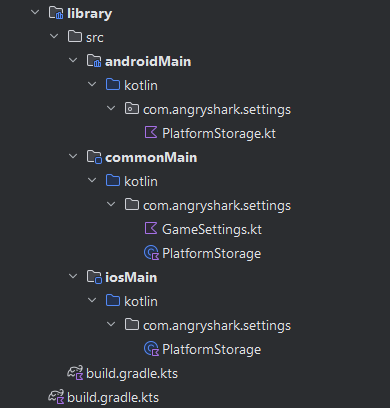
A KMP project divides code into source sets. This structure might look familiar if you’ve worked with Unity’s platform-specific compilation directives.
Here’s the basic structure:
src/
  commonMain/          // Shared code (Android + iOS)
    kotlin/
      GameSettings.kt
      PlatformStorage.kt (expect declarations)

  androidMain/         // Android-only code
    kotlin/
      PlatformStorage.kt (actual implementation)

  iosMain/            // iOS-only code
    kotlin/
      PlatformStorage.kt (actual implementation)
You write most code in commonMain. Only platform-specific implementations go in androidMain and iosMain.
The compiler handles the rest. When building for Android, it combines commonMain + androidMain. When building for iOS, it combines commonMain + iosMain.
Setting Up a KMP Project
KMP projects use Gradle for configuration. If you’ve set up Android builds, this looks familiar. Follow the official Kotlin Multiplatform getting started guide for detailed setup instructions.
Here’s a minimal build.gradle.kts:
plugins {
    kotlin("multiplatform") version "2.2.20"
    id("com.android.library")
}

kotlin {
    androidTarget {
        compilations.all {
            kotlinOptions {
                jvmTarget = "17"
            }
        }
    }

    listOf(
        iosX64(),
        iosArm64(),
        iosSimulatorArm64()
    ).forEach {
        it.binaries.framework {
            baseName = "GameSettings"
        }
    }

    sourceSets {
        commonMain.dependencies {
            implementation("org.jetbrains.kotlinx:kotlinx-coroutines-core:1.9.0")
        }

        androidMain.dependencies {
            implementation("androidx.core:core-ktx:1.15.0")
        }

        val iosMain by creating {
            dependsOn(commonMain.get())
        }
    }
}
Key points:
- The
kotlin("multiplatform")plugin enables KMP (version 2.2.20 is the latest stable as of 2025) androidTargetconfigures Android compilation with Java 17 target- iOS targets specify which architectures to build (simulator, device, etc.)
sourceSetsdefines shared and platform dependencies using modern syntax
For Android, this produces an AAR library. For iOS, it produces a Framework you link in Xcode.
Modern Alternative: Consider using Gradle version catalogs (
gradle/libs.versions.toml) to centralize version management. This makes updating dependencies across projects easier and follows current Gradle best practices.

Real-World Use Cases for Unity Developers
Here are scenarios where KMP makes sense:
1. Analytics Wrapper
You probably use different analytics SDKs (Firebase, Unity Analytics, custom backend). Wrap them in KMP:
// commonMain
class AnalyticsManager {
    private val tracker = PlatformAnalytics()

    fun trackEvent(name: String, properties: Map<String, Any>) {
        tracker.logEvent(name, properties)
    }

    fun setUserProperty(key: String, value: String) {
        tracker.setProperty(key, value)
    }
}

expect class PlatformAnalytics() {
    fun logEvent(name: String, properties: Map<String, Any>)
    fun setProperty(key: String, value: String)
}

// androidMain
actual class PlatformAnalytics {
    private val firebase = FirebaseAnalytics.getInstance(context)

    actual fun logEvent(name: String, properties: Map<String, Any>) {
        val bundle = Bundle()
        properties.forEach { (k, v) ->
            bundle.putString(k, v.toString())
        }
        firebase.logEvent(name, bundle)
    }

    actual fun setProperty(key: String, value: String) {
        firebase.setUserProperty(key, value)
    }
}

// iosMain (similar implementation for iOS analytics)
Now your Unity game calls one analytics API. The native wrapper handles platform differences.
2. Cloud Save Manager
Different platforms often have different cloud save systems (Google Play Games, Game Center, custom backend):
// commonMain
class CloudSaveManager {
    private val storage = PlatformCloudStorage()

    suspend fun saveGame(data: ByteArray): Result<Unit> {
        return storage.upload("savegame.dat", data)
    }

    suspend fun loadGame(): Result<ByteArray> {
        return storage.download("savegame.dat")
    }
}

expect class PlatformCloudStorage() {
    suspend fun upload(filename: String, data: ByteArray): Result<Unit>
    suspend fun download(filename: String): Result<ByteArray>
}
Write your save/load logic once. Each platform handles its cloud service.
3. Network Layer
Many Unity games talk to custom backends. KMP can handle the API calls:
// commonMain with Ktor (KMP networking library)
class GameApiClient(private val baseUrl: String) {
    private val client = HttpClient()

    suspend fun getPlayerProfile(playerId: String): PlayerProfile {
        return client.get("$baseUrl/players/$playerId").body()
    }

    suspend fun submitScore(playerId: String, score: Int): Boolean {
        val response = client.post("$baseUrl/scores") {
            setBody(ScoreSubmission(playerId, score))
        }
        return response.status.isSuccess()
    }
}
This code runs on both platforms. The HTTP client works identically on Android and iOS.
When NOT to Use KMP
KMP isn’t always the answer. Here’s when to skip it:
1. Your game is fully in Unity with minimal native code
If you only call native functions for permissions or basic services, a simple Unity plugin is simpler.
2. You need extensive UI code
KMP shares business logic, not UI. If most of your native code is UI (custom menus, complex screens), you’re better off with native UI frameworks per platform.
3. Platform differences are too large
If Android and iOS implementations are fundamentally different, forcing them into shared code creates more complexity than it solves.
4. Small project with no plans to scale
For a quick prototype or small app, the setup overhead might not be worth it.
Challenges and Trade-offs
Learning Curve
You’re adding Kotlin to your stack. If you only know C# and Unity, there’s a learning period. Kotlin syntax is similar to C#, but the ecosystem and tools differ.
Build System Complexity
Gradle configuration can be tricky. You need to understand how Android and iOS builds work at a deeper level than typical Unity development requires.
Debugging
Debugging shared code means working with Android Studio and Xcode. Stack traces span both native and shared code. It’s more complex than debugging pure Unity C#.
Library Availability
Not every Kotlin library supports KMP. Some Android libraries work fine, but you can’t use them in shared code. Check library compatibility before committing to KMP.
Getting Started: Next Steps
If you want to try KMP:
1. Start Small
Don’t migrate everything. Pick one isolated system (settings, analytics) and implement it in KMP. Learn the workflow before expanding.
2. Set Up Your Environment
You need Android Studio with the KMP plugin. The plugin helps create projects and manage source sets.
3. Build a Simple Test
Create a KMP library that returns platform names. Call it from Unity on both Android and iOS. Get the build pipeline working before adding complexity.
4. Learn Kotlin Basics
If you know C#, Kotlin feels familiar. Focus on differences: null safety, data classes, coroutines, and the standard library.
5. Explore KMP Libraries
The ecosystem is growing. Libraries like Ktor (networking), SQLDelight (database), and Koin (dependency injection) all support KMP.
Integration with Unity
Connecting KMP to Unity requires a thin plugin layer on each platform. Unity provides comprehensive documentation for Android native plugins and iOS native plugins.
For Android:
Your KMP library builds to an AAR file. Add it to Unity’s Assets/Plugins/Android/ folder. Call it through JNI:
private AndroidJavaObject kmpLibrary;

void Start() {
    AndroidJavaClass unityPlayer = new AndroidJavaClass("com.unity3d.player.UnityPlayer");
    AndroidJavaObject context = unityPlayer.GetStatic<AndroidJavaObject>("currentActivity");
    kmpLibrary = new AndroidJavaObject("com.example.GameSettings", context);
}

public void SaveSetting(string key, string value) {
    kmpLibrary.Call("saveSetting", key, value);
}
For iOS:
Your KMP library builds to a Framework. Add it to your Xcode project. Call it through P/Invoke:
#if UNITY_IOS
[DllImport("__Internal")]
private static extern void saveSetting(string key, string value);

public void SaveSetting(string key, string value) {
    saveSetting(key, value);
}
#endif
The KMP code handles the business logic. Unity just calls simple functions.

Is KMP Right for Your Project?
Ask these questions:
Do you maintain significant native code for both Android and iOS? If yes, KMP reduces duplication.
Is your native code mostly business logic? If it’s mostly UI, KMP helps less.
Are you comfortable learning Kotlin and Gradle? If not, factor in learning time.
Will you build more mobile features in the future? If yes, KMP becomes more valuable over time.
Do you have time for setup and tooling? Initial setup takes longer than writing platform-specific code twice.
Wrapping Up
Kotlin Multiplatform gives Unity developers a way to share native code across Android and iOS. You write business logic once and maintain it in one place.
It’s not simpler than writing everything in Unity. But when Unity hands control to native code, KMP prevents you from maintaining two separate codebases.
The expect/actual pattern keeps platform-specific code isolated. Shared code stays clean. The compiler enforces correctness at build time.
If you’re building complex native features around your Unity game, KMP is worth evaluating. Start small, learn the tools, and expand as you get comfortable.
Your Unity game already runs on both platforms. Now your native wrapper code can too.
Resources
Last updated: October 11, 2025

About Angry Shark Studio
Angry Shark Studio is a professional Unity AR/VR development studio specializing in mobile multiplatform applications and AI solutions. Our team includes Unity Certified Expert Programmers with extensive experience in AR/VR development.
Related Articles
More Articles
Explore more insights on Unity AR/VR development, mobile apps, and emerging technologies.
View All Articles