JSON-RPC 2.0 in Model Context Protocol (MCP): Complete Guide
Your AI assistant just called a database tool. The request was 147 bytes of JSON. The response came back in 89 bytes. Between them, they accomplished what used to require custom protocols and complex serialization.
JSON made it simple.
We’ve covered what MCP does and how the architecture works. Now we’re examining the language MCP speaks: JSON-RPC 2.0 messages.
By the end of this post, you’ll understand exactly how MCP messages work and how to construct them yourself. You’ll see the structure of requests, responses, and notifications. You’ll learn error handling patterns and validation rules. You’ll have complete code examples for every message type.
Prerequisites
This post builds on previous concepts:
- Post #8: Core Concepts - Tools, resources, prompts, sessions
- Post #9: Architecture - Client-server communication flow
You should also have basic understanding of:
- JSON syntax (objects, arrays, strings, numbers)
- Request-response patterns
- Asynchronous programming concepts
If you’re comfortable with REST APIs or GraphQL, you’ll recognize many patterns here.
Why JSON? Why JSON-RPC 2.0?
The Decision Behind the Format
MCP uses JSON-RPC 2.0 for specific reasons. Let’s examine the alternatives that were rejected and why.
Why not custom binary protocol?
Binary protocols are compact and fast, but they sacrifice clarity:
- Debugging requires specialized tools
- Implementation differs across languages
- No human readability during development
- Higher barrier to entry for developers
Why not plain JSON?
Plain JSON works for simple cases, but lacks structure:
- No standardized request-response correlation
- No convention for error handling
- Every implementation invents its own message format
- Difficult to build generic tooling
Why JSON-RPC 2.0 specifically?
JSON-RPC 2.0 provides everything MCP needs:
{
  "jsonrpc": "2.0",
  "method": "tools/call",
  "params": {"name": "search", "arguments": {"query": "test"}},
  "id": 1
}
The advantages:
Proven standard. Used in Ethereum, VS Code Language Server Protocol, and many production APIs. The specification is stable and well-understood.
Simple spec. The entire specification fits on a few pages. Easy to implement correctly in any language.
Async support. Request IDs enable asynchronous operations. Send multiple requests without waiting for responses.
Batch requests. Multiple operations in one message reduce network round trips.
Clear errors. Standardized error codes and format make error handling consistent.
Here’s what MCP avoided:
# Custom format (what we didn't do)
{
    "type": "request",
    "version": "1.0",
    "command": "call_tool",
    "data": {...},
    "request_id": "abc123",
    "timestamp": "2025-10-02T10:30:00Z"
}

# JSON-RPC 2.0 (what MCP uses)
{
    "jsonrpc": "2.0",
    "method": "tools/call",
    "params": {...},
    "id": 1
}
The second format is shorter, standardized, and comes with existing libraries in every language.
Benefits for MCP
JSON-RPC 2.0 gives MCP several advantages:
Existing implementations. Libraries available in Python, JavaScript, TypeScript, Go, Rust, and every major language. No need to write parsers from scratch.
Developer familiarity. Many developers have used JSON-RPC before. The patterns are recognizable.
Transport independence. JSON-RPC works over any transport: stdio, HTTP, WebSocket, custom protocols. The message format stays the same.
Easy validation. JSON schema validation tools work out of the box. Test messages with standard tooling.
Message Structure Fundamentals
The Three Core Message Types
JSON-RPC 2.0 defines three message types. Every MCP message is one of these:
1. Request - Client asks server to do something. Expects a response.
2. Response - Server answers a request. Includes result or error.
3. Notification - One-way message. No response expected.
All three types share one required field:
{
    "jsonrpc": "2.0"
}
This field must be present in every message with the exact value "2.0". It identifies the message as JSON-RPC 2.0.
Request Structure
Requests have four fields:
{
    "jsonrpc": "2.0",
    "method": "string",
    "params": "object or array (optional)",
    "id": "number or string"
}
method: String identifying what operation to perform. In MCP, methods use namespaced format like tools/call or resources/read.
params: Arguments for the method. Can be an object (named parameters) or array (positional parameters). Optional if the method needs no arguments.
id: Correlation identifier. The response will include this same ID so the client knows which request it answers. Can be a number or string.
Response Structure
Responses have three fields and come in two forms:
Success response:
{
    "jsonrpc": "2.0",
    "result": "any valid JSON value",
    "id": "number or string"
}
Error response:
{
    "jsonrpc": "2.0",
    "error": {
        "code": -32601,
        "message": "Method not found",
        "data": "optional additional info"
    },
    "id": "number or string or null"
}
The response must have either result or error, never both. The id must match the request ID.
Notification Structure
Notifications look like requests but lack the id field:
{
    "jsonrpc": "2.0",
    "method": "notifications/progress",
    "params": {"progress": 50, "total": 100}
}
No id field means no response expected. The sender fires and forgets.
Message Validation Rules
Here’s how to validate basic JSON-RPC structure:
def validate_json_rpc_message(message):
    """Validate basic JSON-RPC structure"""

    # Must be an object
    if not isinstance(message, dict):
        return False, "Message must be JSON object"

    # Must have jsonrpc field with value "2.0"
    if message.get("jsonrpc") != "2.0":
        return False, "Missing or invalid jsonrpc field"

    # Determine message type
    has_method = "method" in message
    has_result = "result" in message
    has_error = "error" in message
    has_id = "id" in message

    # Request or Notification
    if has_method:
        # Must have valid method string
        if not isinstance(message["method"], str):
            return False, "Method must be string"

        # If has ID, it's a request; otherwise notification
        if has_id:
            return True, "Valid request"
        else:
            return True, "Valid notification"

    # Response
    elif has_result or has_error:
        # Must have ID
        if not has_id:
            return False, "Response must have id"

        # Cannot have both result and error
        if has_result and has_error:
            return False, "Cannot have both result and error"

        return True, "Valid response"

    else:
        return False, "Invalid message structure"
ID Field Best Practices
Request IDs can be numbers or strings:
# Valid ID types
valid_ids = [
    1,              # Number
    "abc",          # String
    "uuid-123",     # String with format
]

# Invalid ID types
invalid_ids = [
    None,           # Reserved for notifications
    [1, 2],         # Arrays not allowed
    {"id": 1},      # Objects not allowed
    1.5,            # Fractional numbers discouraged
]
For sequential requests, simple incrementing numbers work well:
class RequestIDGenerator:
    def __init__(self):
        self._counter = 0

    def next_id(self):
        """Generate monotonically increasing ID"""
        self._counter += 1
        return self._counter
Request Messages in Detail
The Method Field
The method field identifies what operation to perform. It’s a case-sensitive string.
MCP uses namespaced methods for clarity:
MCP_METHODS = {
    # Lifecycle
    "initialize": "Start a new session",
    "initialized": "Confirm initialization complete",

    # Tools
    "tools/list": "List available tools",
    "tools/call": "Execute a tool",

    # Resources
    "resources/list": "List available resources",
    "resources/read": "Read a resource",
    "resources/subscribe": "Subscribe to resource updates",
    "resources/unsubscribe": "Unsubscribe from resource",

    # Prompts
    "prompts/list": "List available prompts",
    "prompts/get": "Get a prompt template",

    # Logging
    "logging/setLevel": "Set logging level"
}
The namespace prefix (tools/, resources/, etc.) groups related operations.
Simple Request Example
Here’s the simplest possible request:
{
    "jsonrpc": "2.0",
    "method": "tools/list",
    "id": 1
}
This asks the server to list all available tools. No parameters needed.
Request with Parameters
Most requests include parameters:
{
    "jsonrpc": "2.0",
    "method": "tools/call",
    "params": {
        "name": "search_database",
        "arguments": {
            "query": "SELECT * FROM users WHERE active = true",
            "limit": 10
        }
    },
    "id": 2
}
MCP uses named parameters (object format) rather than positional parameters (array format). Named parameters are clearer and more maintainable.
Parameter Patterns
Named parameters (object):
{
    "jsonrpc": "2.0",
    "method": "resources/read",
    "params": {
        "uri": "file:///config.json"
    },
    "id": 3
}
Positional parameters (array):
{
    "jsonrpc": "2.0",
    "method": "add_numbers",
    "params": [5, 3],
    "id": 4
}
MCP prefers named parameters for clarity, but both are valid JSON-RPC.
No parameters:
{
    "jsonrpc": "2.0",
    "method": "tools/list",
    "id": 5
}
Omit the params field entirely when not needed.
Complete Tool Call Request
Here’s a realistic tool call with complex arguments:
{
    "jsonrpc": "2.0",
    "method": "tools/call",
    "params": {
        "name": "send_email",
        "arguments": {
            "to": "user@example.com",
            "subject": "Test Message",
            "body": "This is a test email sent via MCP tool",
            "attachments": [
                {
                    "filename": "report.pdf",
                    "content_type": "application/pdf",
                    "data": "base64_encoded_content_here"
                }
            ]
        }
    },
    "id": 10
}
The arguments object contains whatever the tool needs. The structure depends on the tool’s inputSchema.
Initialize Request
Session initialization uses a special request format:
{
    "jsonrpc": "2.0",
    "method": "initialize",
    "params": {
        "protocolVersion": "0.1.0",
        "capabilities": {
            "tools": {},
            "resources": {
                "subscribe": true
            },
            "prompts": {},
            "logging": {}
        },
        "clientInfo": {
            "name": "ExampleClient",
            "version": "1.0.0"
        }
    },
    "id": 1
}
This negotiates protocol version and announces client capabilities.
Request Builder Helper
Building requests manually gets tedious. Here’s a helper class:
class MCPRequestBuilder:
    """Helper class to build valid MCP requests"""

    def __init__(self):
        self.id_generator = RequestIDGenerator()

    def build_request(
        self,
        method: str,
        params: dict = None
    ) -> dict:
        """Build a properly formatted request"""
        request = {
            "jsonrpc": "2.0",
            "method": method,
            "id": self.id_generator.next_id()
        }

        if params is not None:
            request["params"] = params

        return request

    # Convenience methods for common requests

    def list_tools(self) -> dict:
        """Build tools/list request"""
        return self.build_request("tools/list")

    def call_tool(self, name: str, arguments: dict) -> dict:
        """Build tools/call request"""
        return self.build_request(
            "tools/call",
            {"name": name, "arguments": arguments}
        )

    def read_resource(self, uri: str) -> dict:
        """Build resources/read request"""
        return self.build_request(
            "resources/read",
            {"uri": uri}
        )

# Usage
builder = MCPRequestBuilder()

request1 = builder.list_tools()
# {"jsonrpc": "2.0", "method": "tools/list", "id": 1}

request2 = builder.call_tool(
    "search",
    {"query": "test", "limit": 5}
)
# {"jsonrpc": "2.0", "method": "tools/call",
#  "params": {"name": "search", "arguments": {...}}, "id": 2}
Response Messages in Detail
Two Response Types
Responses come in two forms:
Success response - Operation completed successfully Error response - Operation failed
Both use the same basic structure with different fields.
Success Response Structure
{
    "jsonrpc": "2.0",
    "result": "<any valid JSON value>",
    "id": "<matches request id>"
}
The result field can contain any valid JSON: object, array, string, number, boolean, or null.
Simple Success Response
Response to tools/list request:
{
    "jsonrpc": "2.0",
    "result": {
        "tools": [
            {
                "name": "search_database",
                "description": "Search the database",
                "inputSchema": {
                    "type": "object",
                    "properties": {
                        "query": {"type": "string"}
                    }
                }
            }
        ]
    },
    "id": 1
}
Tool Execution Result
Response to tools/call request:
{
    "jsonrpc": "2.0",
    "result": {
        "content": [
            {
                "type": "text",
                "text": "Found 3 matching records:\n1. John Doe\n2. Jane Smith\n3. Bob Johnson"
            }
        ]
    },
    "id": 2
}
MCP tool results use a content array to return multiple pieces of information.
Resource Read Result
Response to resources/read request:
{
    "jsonrpc": "2.0",
    "result": {
        "contents": [
            {
                "uri": "file:///config.json",
                "mimeType": "application/json",
                "text": "{\"setting1\": \"value1\", \"setting2\": \"value2\"}"
            }
        ]
    },
    "id": 3
}
Error Response Structure
{
    "jsonrpc": "2.0",
    "error": {
        "code": "<integer error code>",
        "message": "<string error message>",
        "data": "<optional additional data>"
    },
    "id": "<matches request id, or null>"
}
The error object has three fields:
code: Integer error code. Negative numbers reserved for JSON-RPC and application use.
message: Short description of the error. Should be concise.
data: Optional additional information. Can be any JSON type.
Standard JSON-RPC Error Codes
JSONRPC_ERROR_CODES = {
    -32700: "Parse error - Invalid JSON received",
    -32600: "Invalid Request - JSON is not valid request",
    -32601: "Method not found",
    -32602: "Invalid params",
    -32603: "Internal error",
}
These codes are defined by JSON-RPC 2.0 specification.
MCP-Specific Error Codes
MCP defines application-specific error codes:
MCP_ERROR_CODES = {
    -32001: "Tool not found",
    -32002: "Tool execution failed",
    -32003: "Resource not found",
    -32004: "Resource unavailable",
    -32005: "Invalid resource URI",
}
Application-defined codes use the range -32000 to -32099.
Error Response Examples
Method not found:
{
    "jsonrpc": "2.0",
    "error": {
        "code": -32601,
        "message": "Method not found",
        "data": {
            "method": "invalid/method",
            "available_methods": [
                "tools/list",
                "tools/call",
                "resources/read"
            ]
        }
    },
    "id": 5
}
Tool execution failed:
{
    "jsonrpc": "2.0",
    "error": {
        "code": -32002,
        "message": "Tool execution failed",
        "data": {
            "tool": "database_query",
            "reason": "Connection timeout",
            "details": "Database server not responding after 5 seconds"
        }
    },
    "id": 10
}
Invalid parameters:
{
    "jsonrpc": "2.0",
    "error": {
        "code": -32602,
        "message": "Invalid params",
        "data": {
            "expected": {
                "uri": "string (required)"
            },
            "received": {
                "url": "file:///test.txt"
            },
            "error": "Missing required parameter 'uri'"
        }
    },
    "id": 7
}
Response Handler Implementation
class MCPResponseHandler:
    """Handle MCP responses"""

    async def handle_response(self, response: dict):
        """Process a response message"""

        # Validate basic structure
        if not self.is_valid_response(response):
            raise ValueError("Invalid response format")

        request_id = response.get("id")

        # Check for error
        if "error" in response:
            error = response["error"]
            raise MCPError(
                code=error["code"],
                message=error["message"],
                data=error.get("data")
            )

        # Success - return result
        return response.get("result")

    def is_valid_response(self, response: dict) -> bool:
        """Validate response structure"""
        if response.get("jsonrpc") != "2.0":
            return False

        if "id" not in response:
            return False

        # Must have either result or error, not both
        has_result = "result" in response
        has_error = "error" in response

        if has_result and has_error:
            return False

        if not has_result and not has_error:
            return False

        return True
Notification Messages
What Are Notifications?
Notifications are one-way messages. The sender doesn’t expect a response.
Key characteristics:
- No
idfield - Fire and forget
- Used for events and logging
- Recipient can’t send errors back
Notification Structure
{
    "jsonrpc": "2.0",
    "method": "notification/method",
    "params": {...}
}
The absence of id distinguishes notifications from requests.
MCP Notification Examples
Initialized notification:
{
    "jsonrpc": "2.0",
    "method": "initialized"
}
Sent by client after receiving initialize response.
Progress notification:
{
    "jsonrpc": "2.0",
    "method": "notifications/progress",
    "params": {
        "progressToken": "token-123",
        "progress": 50,
        "total": 100
    }
}
Sent by server during long-running operations.
Resource updated notification:
{
    "jsonrpc": "2.0",
    "method": "notifications/resources/updated",
    "params": {
        "uri": "file:///watched/config.json"
    }
}
Sent by server when subscribed resource changes.
Log message notification:
{
    "jsonrpc": "2.0",
    "method": "notifications/message",
    "params": {
        "level": "info",
        "logger": "mcp.server",
        "data": "Tool execution completed successfully"
    }
}
When to Use Notifications vs Requests
# Use REQUEST when you need a response
request = {
    "jsonrpc": "2.0",
    "method": "tools/call",
    "params": {"name": "get_data"},
    "id": 1  # Expect response
}

# Use NOTIFICATION when you don't need confirmation
notification = {
    "jsonrpc": "2.0",
    "method": "notifications/cancelled",
    "params": {"requestId": 5}
    # No id - fire and forget
}
Requests block waiting for response. Notifications don’t.
Notification Handler
class NotificationHandler:
    """Handle incoming notifications"""

    def __init__(self):
        self.handlers = {}

    def register(self, method: str, handler):
        """Register notification handler"""
        self.handlers[method] = handler

    async def handle_notification(self, notification: dict):
        """Process notification"""

        # Validate it's a notification (no id field)
        if "id" in notification:
            raise ValueError("Not a notification")

        method = notification.get("method")
        params = notification.get("params", {})

        # Find handler
        if method in self.handlers:
            await self.handlers[method](params)
        else:
            # Unknown notification - safe to ignore
            pass

# Usage
handler = NotificationHandler()

async def on_progress(params):
    print(f"Progress: {params['progress']}/{params['total']}")

async def on_resource_update(params):
    print(f"Resource updated: {params['uri']}")

handler.register("notifications/progress", on_progress)
handler.register("notifications/resources/updated", on_resource_update)
Error Handling in JSON
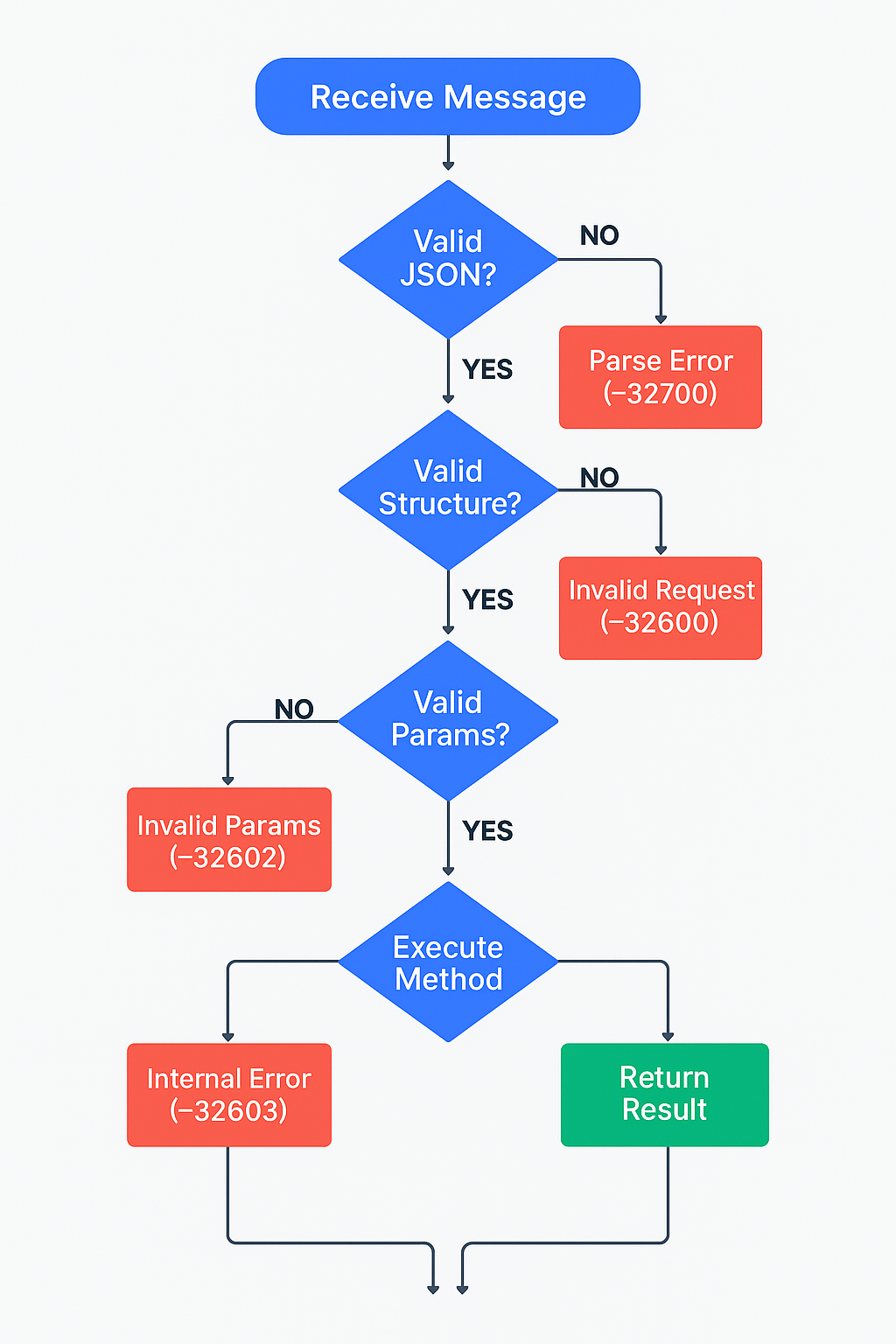
Complete Error Structure
{
    "jsonrpc": "2.0",
    "error": {
        "code": -32603,
        "message": "Internal error",
        "data": {
            // Additional context
        }
    },
    "id": null  // null if error during request parsing
}
When the server can’t parse a request, id is null because the request ID is unknown.
Error Code Ranges
ERROR_CODE_RANGES = {
    # JSON-RPC reserved codes
    (-32768, -32000): "Reserved for JSON-RPC spec",

    # Server error range (available for app use)
    (-32099, -32000): "Server error range",

    # MCP application errors
    (-32999, -32100): "MCP-specific errors"
}
MCP Error Catalog
class MCPErrorCode:
    """MCP-specific error codes"""

    # Standard JSON-RPC errors
    PARSE_ERROR = -32700
    INVALID_REQUEST = -32600
    METHOD_NOT_FOUND = -32601
    INVALID_PARAMS = -32602
    INTERNAL_ERROR = -32603

    # MCP application errors
    TOOL_NOT_FOUND = -32001
    TOOL_EXECUTION_ERROR = -32002
    RESOURCE_NOT_FOUND = -32003
    RESOURCE_UNAVAILABLE = -32004
    INVALID_RESOURCE_URI = -32005
    PROMPT_NOT_FOUND = -32006
    UNAUTHORIZED = -32007
    RATE_LIMIT_EXCEEDED = -32008
Creating Error Responses
def create_error_response(
    request_id: int | str | None,
    code: int,
    message: str,
    data: any = None
) -> dict:
    """Build an error response"""

    error_response = {
        "jsonrpc": "2.0",
        "error": {
            "code": code,
            "message": message
        },
        "id": request_id
    }

    if data is not None:
        error_response["error"]["data"] = data

    return error_response

# Examples
error1 = create_error_response(
    request_id=5,
    code=-32601,
    message="Method not found",
    data={"method": "invalid/method"}
)

error2 = create_error_response(
    request_id=10,
    code=-32002,
    message="Tool execution failed",
    data={
        "tool": "database_query",
        "exception": "ConnectionTimeout",
        "details": "Server not responding"
    }
)
Error Handling Patterns
Server-side error handling:
async def execute_tool_request(request):
    """Execute tool and return proper response or error"""

    try:
        tool_name = request["params"]["name"]
        arguments = request["params"]["arguments"]

        # Execute tool
        result = await run_tool(tool_name, arguments)

        # Success response
        return {
            "jsonrpc": "2.0",
            "result": result,
            "id": request["id"]
        }

    except KeyError as e:
        # Invalid parameters
        return create_error_response(
            request.get("id"),
            -32602,
            "Invalid params",
            {"missing": str(e)}
        )

    except ToolNotFoundError:
        return create_error_response(
            request.get("id"),
            -32001,
            "Tool not found",
            {"tool": tool_name}
        )

    except Exception as e:
        # Unexpected error
        return create_error_response(
            request.get("id"),
            -32603,
            "Internal error",
            {"exception": type(e).__name__}
        )
Client-side error handling:
async def make_request_with_error_handling(client, request):
    """Send request and handle errors properly"""

    response = await client.send(request)

    # Check for error
    if "error" in response:
        error = response["error"]
        code = error["code"]

        # Handle specific error codes
        if code == -32601:
            print(f"Method not found: {error['message']}")
            # Maybe retry with different method

        elif code == -32602:
            print(f"Invalid parameters: {error.get('data')}")
            # Fix parameters and retry

        elif code == -32002:
            print(f"Tool failed: {error.get('data')}")
            # Tool execution error - don't retry

        else:
            print(f"Error {code}: {error['message']}")

        raise MCPError(code, error["message"])

    # Success
    return response["result"]
Real-World Message Flow Examples
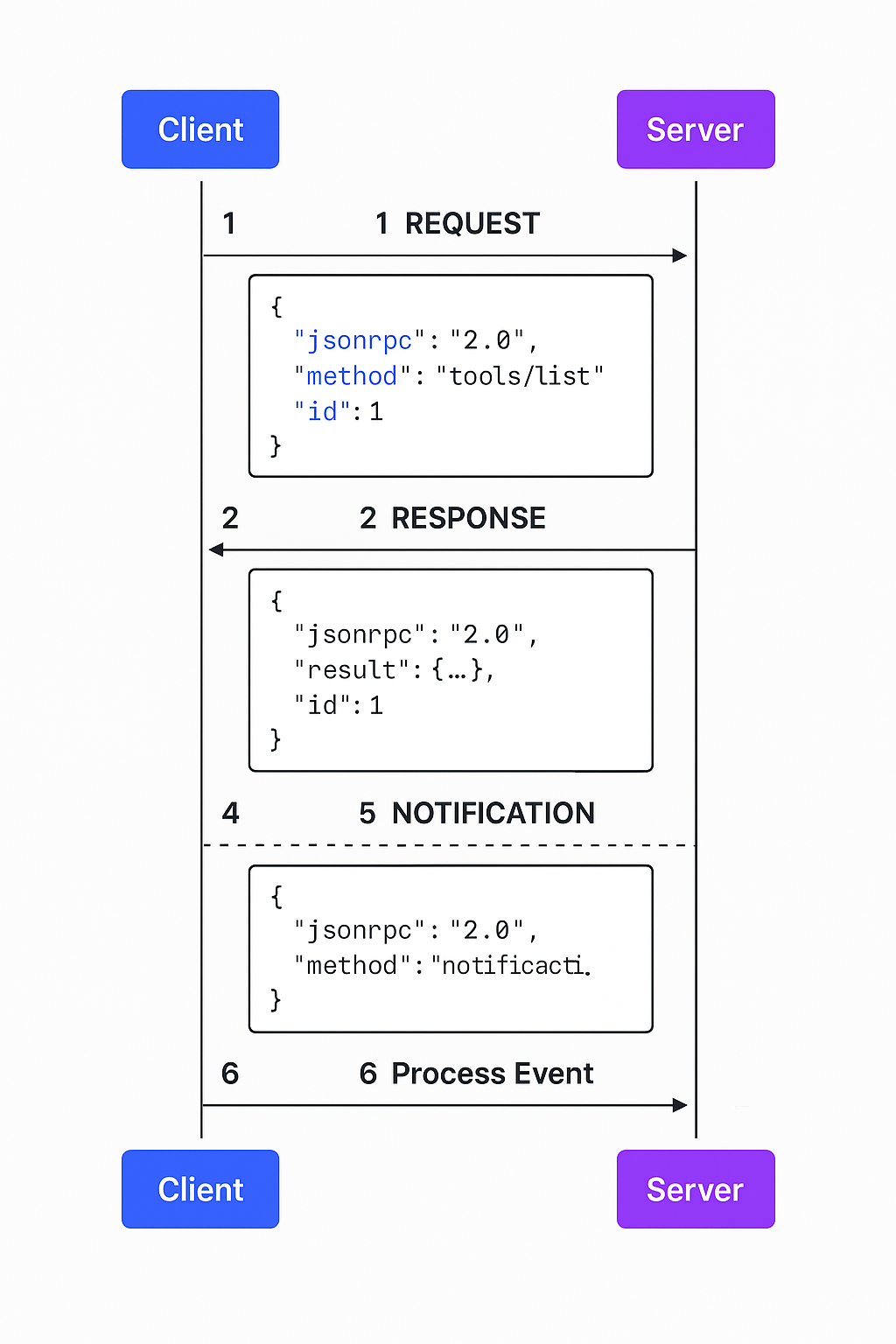
Flow 1: Initialize Session
Complete initialization sequence:
// Client sends initialize request
{
    "jsonrpc": "2.0",
    "method": "initialize",
    "params": {
        "protocolVersion": "0.1.0",
        "capabilities": {
            "tools": {}
        },
        "clientInfo": {
            "name": "MyClient",
            "version": "1.0.0"
        }
    },
    "id": 1
}

// Server responds with capabilities
{
    "jsonrpc": "2.0",
    "result": {
        "protocolVersion": "0.1.0",
        "capabilities": {
            "tools": {
                "listChanged": true
            },
            "resources": {
                "subscribe": true,
                "listChanged": true
            }
        },
        "serverInfo": {
            "name": "MyMCPServer",
            "version": "2.0.0"
        }
    },
    "id": 1
}

// Client sends initialized notification
{
    "jsonrpc": "2.0",
    "method": "initialized"
}
Flow 2: List and Call Tools
// Step 1: List available tools
{
    "jsonrpc": "2.0",
    "method": "tools/list",
    "id": 2
}

// Server responds with tools
{
    "jsonrpc": "2.0",
    "result": {
        "tools": [
            {
                "name": "search_contacts",
                "description": "Search contacts by name or email",
                "inputSchema": {
                    "type": "object",
                    "properties": {
                        "query": {"type": "string"},
                        "limit": {"type": "number", "default": 10}
                    },
                    "required": ["query"]
                }
            }
        ]
    },
    "id": 2
}

// Step 2: Call the tool
{
    "jsonrpc": "2.0",
    "method": "tools/call",
    "params": {
        "name": "search_contacts",
        "arguments": {
            "query": "john",
            "limit": 5
        }
    },
    "id": 3
}

// Server returns results
{
    "jsonrpc": "2.0",
    "result": {
        "content": [
            {
                "type": "text",
                "text": "Found 3 contacts:\n1. John Smith (john@example.com)\n2. John Doe (jdoe@example.com)\n3. Johnny Walker (jwalker@example.com)"
            }
        ]
    },
    "id": 3
}
Flow 3: Resource Read with Subscription
// Read a resource
{
    "jsonrpc": "2.0",
    "method": "resources/read",
    "params": {
        "uri": "file:///app/config.json"
    },
    "id": 4
}

// Server returns resource content
{
    "jsonrpc": "2.0",
    "result": {
        "contents": [
            {
                "uri": "file:///app/config.json",
                "mimeType": "application/json",
                "text": "{\"theme\": \"dark\", \"language\": \"en\"}"
            }
        ]
    },
    "id": 4
}

// Subscribe to resource updates
{
    "jsonrpc": "2.0",
    "method": "resources/subscribe",
    "params": {
        "uri": "file:///app/config.json"
    },
    "id": 5
}

// Server confirms subscription
{
    "jsonrpc": "2.0",
    "result": {},
    "id": 5
}

// Later: Server sends notification when resource changes
{
    "jsonrpc": "2.0",
    "method": "notifications/resources/updated",
    "params": {
        "uri": "file:///app/config.json"
    }
}
Flow 4: Error Handling
// Invalid tool call (missing required parameter)
{
    "jsonrpc": "2.0",
    "method": "tools/call",
    "params": {
        "name": "search_contacts",
        "arguments": {
            "limit": 5
            // Missing required "query" parameter
        }
    },
    "id": 6
}

// Server returns error
{
    "jsonrpc": "2.0",
    "error": {
        "code": -32602,
        "message": "Invalid params",
        "data": {
            "errors": [
                {
                    "path": ["arguments", "query"],
                    "message": "Required property 'query' is missing"
                }
            ]
        }
    },
    "id": 6
}
Complete Python Implementation
Here’s a working example demonstrating the complete flow:
import json
import asyncio
from typing import Any, Dict

class MCPCommunicationExample:
    """Complete example of MCP JSON communication"""

    def __init__(self):
        self.request_id = 0

    def next_id(self):
        """Generate next request ID"""
        self.request_id += 1
        return self.request_id

    async def run_complete_flow(self):
        """Demonstrate complete MCP flow with JSON messages"""

        print("=== MCP JSON Communication Flow ===\n")

        # Step 1: Initialize
        init_request = {
            "jsonrpc": "2.0",
            "method": "initialize",
            "params": {
                "protocolVersion": "0.1.0",
                "capabilities": {"tools": {}},
                "clientInfo": {"name": "Demo", "version": "1.0"}
            },
            "id": self.next_id()
        }
        print("SEND:", json.dumps(init_request, indent=2))

        init_response = {
            "jsonrpc": "2.0",
            "result": {
                "protocolVersion": "0.1.0",
                "capabilities": {"tools": {}},
                "serverInfo": {"name": "DemoServer", "version": "1.0"}
            },
            "id": 1
        }
        print("RECV:", json.dumps(init_response, indent=2), "\n")

        # Step 2: Send initialized notification
        initialized = {
            "jsonrpc": "2.0",
            "method": "initialized"
        }
        print("SEND:", json.dumps(initialized, indent=2), "\n")

        # Step 3: List tools
        list_request = {
            "jsonrpc": "2.0",
            "method": "tools/list",
            "id": self.next_id()
        }
        print("SEND:", json.dumps(list_request, indent=2))

        list_response = {
            "jsonrpc": "2.0",
            "result": {
                "tools": [
                    {
                        "name": "echo",
                        "description": "Echo back input",
                        "inputSchema": {
                            "type": "object",
                            "properties": {
                                "message": {"type": "string"}
                            }
                        }
                    }
                ]
            },
            "id": 2
        }
        print("RECV:", json.dumps(list_response, indent=2), "\n")

        # Step 4: Call tool
        call_request = {
            "jsonrpc": "2.0",
            "method": "tools/call",
            "params": {
                "name": "echo",
                "arguments": {"message": "Hello MCP!"}
            },
            "id": self.next_id()
        }
        print("SEND:", json.dumps(call_request, indent=2))

        call_response = {
            "jsonrpc": "2.0",
            "result": {
                "content": [
                    {"type": "text", "text": "Hello MCP!"}
                ]
            },
            "id": 3
        }
        print("RECV:", json.dumps(call_response, indent=2))

# Run the demo
if __name__ == "__main__":
    demo = MCPCommunicationExample()
    asyncio.run(demo.run_complete_flow())
Message Batching
Why Batch Requests?
Batching reduces network round trips. Instead of sending 10 requests and waiting for 10 responses, send one batch with all 10 requests.
Benefits:
- Fewer network round trips
- Higher throughput
- Lower latency for multiple operations
- More efficient use of network resources
Batch Request Format
Send an array of requests:
[
    {
        "jsonrpc": "2.0",
        "method": "tools/list",
        "id": 1
    },
    {
        "jsonrpc": "2.0",
        "method": "resources/list",
        "id": 2
    },
    {
        "jsonrpc": "2.0",
        "method": "prompts/list",
        "id": 3
    }
]
Batch Response Format
Receive an array of responses:
[
    {
        "jsonrpc": "2.0",
        "result": {"tools": [...]},
        "id": 1
    },
    {
        "jsonrpc": "2.0",
        "result": {"resources": [...]},
        "id": 2
    },
    {
        "jsonrpc": "2.0",
        "result": {"prompts": [...]},
        "id": 3
    }
]
Responses may arrive in any order. Use the id to match responses to requests.
Batch with Notifications
Mix requests and notifications in a batch:
[
    {
        "jsonrpc": "2.0",
        "method": "tools/call",
        "params": {...},
        "id": 1
    },
    {
        "jsonrpc": "2.0",
        "method": "notifications/log",
        "params": {"message": "Batch executed"}
        // No id - notification in batch
    }
]
Only the request gets a response. The notification doesn’t.
Batch Implementation
class BatchRequestManager:
    """Manage batch requests"""

    def __init__(self):
        self.requests = []

    def add_request(self, method: str, params: dict = None):
        """Add request to batch"""
        request = {
            "jsonrpc": "2.0",
            "method": method,
            "id": len(self.requests) + 1
        }
        if params:
            request["params"] = params

        self.requests.append(request)
        return len(self.requests)

    def add_notification(self, method: str, params: dict = None):
        """Add notification to batch"""
        notification = {
            "jsonrpc": "2.0",
            "method": method
        }
        if params:
            notification["params"] = params

        self.requests.append(notification)

    def get_batch(self):
        """Get batch array"""
        return self.requests

    async def send_batch(self, client):
        """Send batch and get responses"""
        batch = self.get_batch()

        # Send as JSON array
        responses = await client.send(batch)

        # Match responses to requests by ID
        response_map = {r["id"]: r for r in responses if "id" in r}

        return response_map

# Usage
batch = BatchRequestManager()
batch.add_request("tools/list")
batch.add_request("resources/list")
batch.add_notification("notifications/log", {"msg": "Batch sent"})

responses = await batch.send_batch(client)
Common Mistakes and Solutions
Mistake 1: Including ID in Notifications
// Wrong - notifications should not have id
{
    "jsonrpc": "2.0",
    "method": "notifications/progress",
    "params": {"progress": 50},
    "id": 1
}

// Right - no id field
{
    "jsonrpc": "2.0",
    "method": "notifications/progress",
    "params": {"progress": 50}
}
Adding id makes it a request, which means the server will try to send a response.
Mistake 2: Wrong jsonrpc Version
// Wrong - must be "2.0"
{
    "jsonrpc": "1.0",
    "method": "tools/list",
    "id": 1
}

// Wrong - wrong field name
{
    "json-rpc": "2.0",
    "method": "tools/list",
    "id": 1
}

// Right
{
    "jsonrpc": "2.0",
    "method": "tools/list",
    "id": 1
}
The field must be exactly "jsonrpc": "2.0".
Mistake 3: Including Both Result and Error
// Wrong - cannot have both
{
    "jsonrpc": "2.0",
    "result": {...},
    "error": {...},
    "id": 1
}

// Right - only result OR error
{
    "jsonrpc": "2.0",
    "result": {...},
    "id": 1
}
Responses must have either result or error, never both.
Mistake 4: Invalid Error Structure
// Wrong - error must be an object
{
    "jsonrpc": "2.0",
    "error": "Something went wrong",
    "id": 1
}

// Right - proper error object
{
    "jsonrpc": "2.0",
    "error": {
        "code": -32603,
        "message": "Something went wrong"
    },
    "id": 1
}
The error field must be an object with code and message.
Mistake 5: Mismatched Request/Response IDs
# Wrong - IDs don't match
request = {"jsonrpc": "2.0", "method": "test", "id": 5}
response = {"jsonrpc": "2.0", "result": {...}, "id": 10}

# Right - IDs match
request = {"jsonrpc": "2.0", "method": "test", "id": 5}
response = {"jsonrpc": "2.0", "result": {...}, "id": 5}
The response id must exactly match the request id.
Mistake 6: Not Handling Parse Errors
# Wrong - no error handling
def process_message(json_string):
    message = json.loads(json_string)  # Can throw
    return handle_message(message)

# Right - catch parse errors
def process_message(json_string):
    try:
        message = json.loads(json_string)
    except json.JSONDecodeError:
        # Return parse error response
        return {
            "jsonrpc": "2.0",
            "error": {
                "code": -32700,
                "message": "Parse error"
            },
            "id": None
        }

    return handle_message(message)
Always handle JSON parse errors and return proper error responses.
Mistake 7: Ignoring Message Validation
# Wrong - assuming structure
def get_method(message):
    return message["method"]  # KeyError if missing

# Right - validate first
def get_method(message):
    if not isinstance(message, dict):
        raise InvalidMessage("Message must be object")

    if "method" not in message:
        raise InvalidMessage("Missing method field")

    return message["method"]
Validate message structure before accessing fields.
Quick Reference Guide
Message Types Cheat Sheet
# REQUEST - Expects response
{
    "jsonrpc": "2.0",
    "method": "string",
    "params": "object|array (optional)",
    "id": "number|string"
}

# RESPONSE (Success)
{
    "jsonrpc": "2.0",
    "result": "any",
    "id": "number|string"
}

# RESPONSE (Error)
{
    "jsonrpc": "2.0",
    "error": {
        "code": "number",
        "message": "string",
        "data": "any (optional)"
    },
    "id": "number|string|null"
}

# NOTIFICATION - No response
{
    "jsonrpc": "2.0",
    "method": "string",
    "params": "object|array (optional)"
    // NO id field
}
Common MCP Methods
# Lifecycle
"initialize"              # Start session
"initialized"             # Notification after init

# Tools
"tools/list"              # Get available tools
"tools/call"              # Execute a tool

# Resources
"resources/list"          # Get available resources
"resources/read"          # Read resource content
"resources/subscribe"     # Watch for changes
"resources/unsubscribe"   # Stop watching

# Prompts
"prompts/list"            # Get available prompts
"prompts/get"             # Get prompt template

# Logging
"logging/setLevel"        # Set log level
"notifications/message"   # Log message notification
Error Code Quick Reference
# JSON-RPC standard errors
-32700  # Parse error
-32600  # Invalid Request
-32601  # Method not found
-32602  # Invalid params
-32603  # Internal error

# MCP-specific errors
-32001  # Tool not found
-32002  # Tool execution failed
-32003  # Resource not found
-32004  # Resource unavailable
Conclusion
JSON-RPC 2.0 gives MCP a solid foundation for communication. The format is simple, well-specified, and proven in production systems.
Key takeaways:
Three message types: request, response, notification. Each has specific fields and validation rules.
Always include "jsonrpc": "2.0" in every message.
Request IDs correlate responses. The response id must match the request id.
Standard error codes enable consistent error handling across implementations.
Batching optimizes multiple operations by reducing network round trips.
What comes next:
Understanding JSON messages is essential for:
- Building MCP clients and servers (covered in future posts)
- Implementing security validation
- Debugging protocol issues
- Creating custom tools and resources
JSON is the language MCP speaks. Now you know how to speak it fluently.
Further reading:
- JSON-RPC 2.0 Specification
- MCP Protocol Specification
- Post #11: Security in MCP (next in series)

About Angry Shark Studio
Angry Shark Studio is a professional Unity AR/VR development studio specializing in mobile multiplatform applications and AI solutions. Our team includes Unity Certified Expert Programmers with extensive experience in AR/VR development.
Related Articles
More Articles
Explore more insights on Unity AR/VR development, mobile apps, and emerging technologies.
View All Articles