Python Async Programming for Game Development Tools
Your game development tool makes three AI API calls: one to ChatGPT for dialogue generation, one to Claude for content moderation, and one to Gemini for translation. Each takes 10 seconds. Your tool sits there for 30 seconds, frozen, while it waits.
This happens because sequential operations waste time. While waiting for ChatGPT to respond, your tool could be asking Claude and Gemini at the same time. Instead, it just sits there doing nothing.
Game development tools need to be responsive. Whether you’re running build automation across multiple platforms, querying multiple AI providers, analyzing logs from many files, or processing assets in a pipeline, all of these benefit from concurrent operations.
This guide shows you how to turn 30-second operations into 10-second operations using Python’s async features. You’ll learn practical patterns for AI integration, build tools, and file processing. All with code you can use today.
What You’ll Learn
By the end of this tutorial, you’ll understand:
- async/await fundamentals in Python
- Running multiple operations concurrently with ‘asyncio.gather’
- Error handling for async operations with timeouts
- Making concurrent AI API calls (ChatGPT, Claude, Gemini)
- Processing multiple files in parallel
- Analyzing Unity builds concurrently
- Testing async functions properly
- Common mistakes and how to avoid them
Prerequisites
Required Knowledge:
- Python 3.7+ basics (functions, classes, loops)
- Understanding of synchronous programming
- Basic concept of I/O operations
Helpful Background:
- Python for Unity Build Automation - Understanding build tools
- Unity AI Chat Integration - Context for AI API examples
- Debugging AI NPCs - Real-world AI tool usage
Environment Setup:
# Python 3.7+ required (3.10+ recommended)
python --version

# Install async-compatible libraries
pip install aiohttp  # Async HTTP requests
pip install aiofiles  # Async file I/O
pip install pytest-asyncio  # Testing async code
Why Async Programming for Game Tools
Game development tools often perform multiple independent operations:
- Calling external APIs (AI providers, analytics, cloud services)
- Processing multiple files (build logs, assets, configs)
- Uploading builds to multiple distribution platforms
- Querying multiple databases
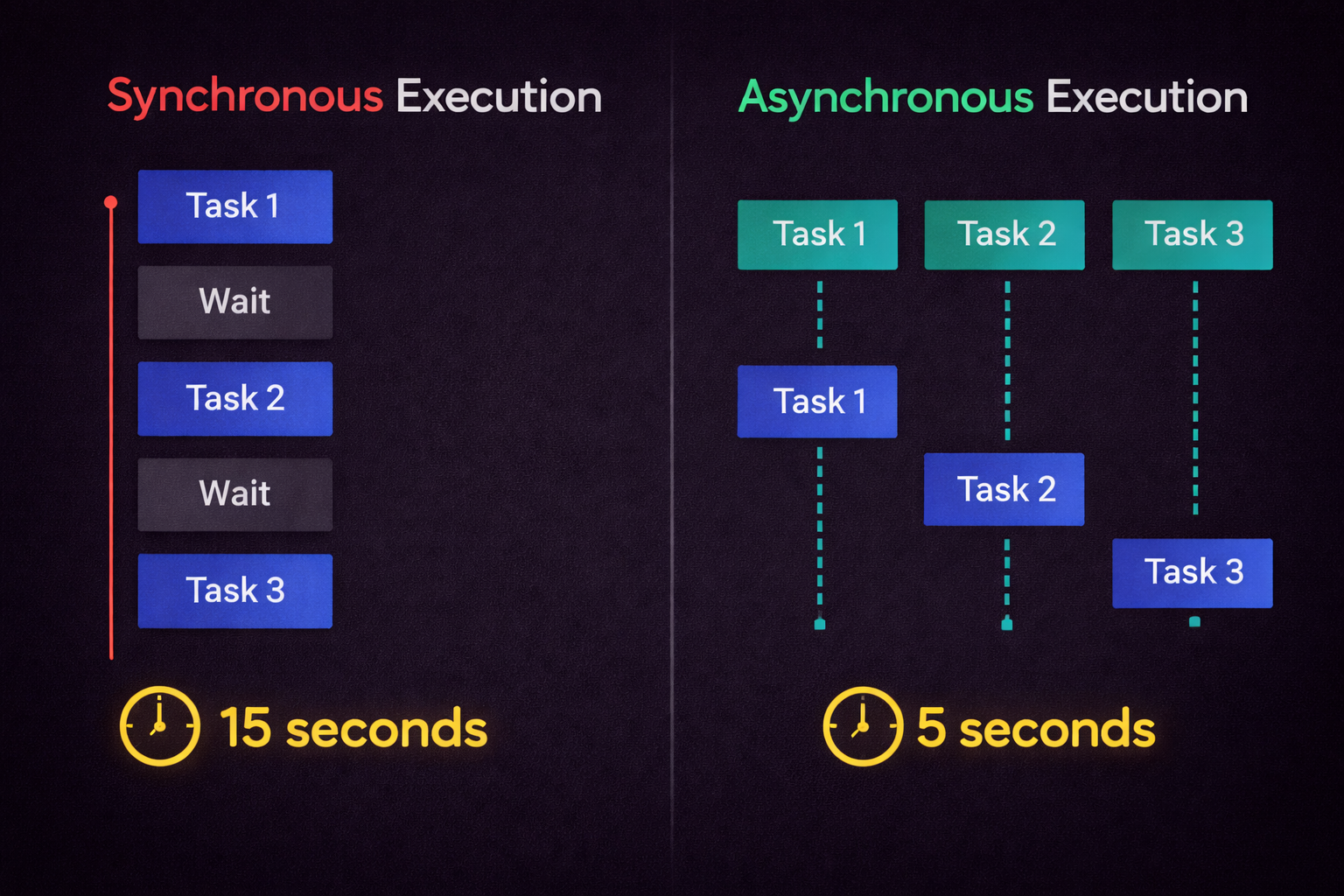
Traditional synchronous code runs these at a time. If each operation takes 5 seconds, 6 operations take 30 seconds. Async programming runs them concurrently, potentially reducing total time to 5 seconds.
Use Cases in Game Development
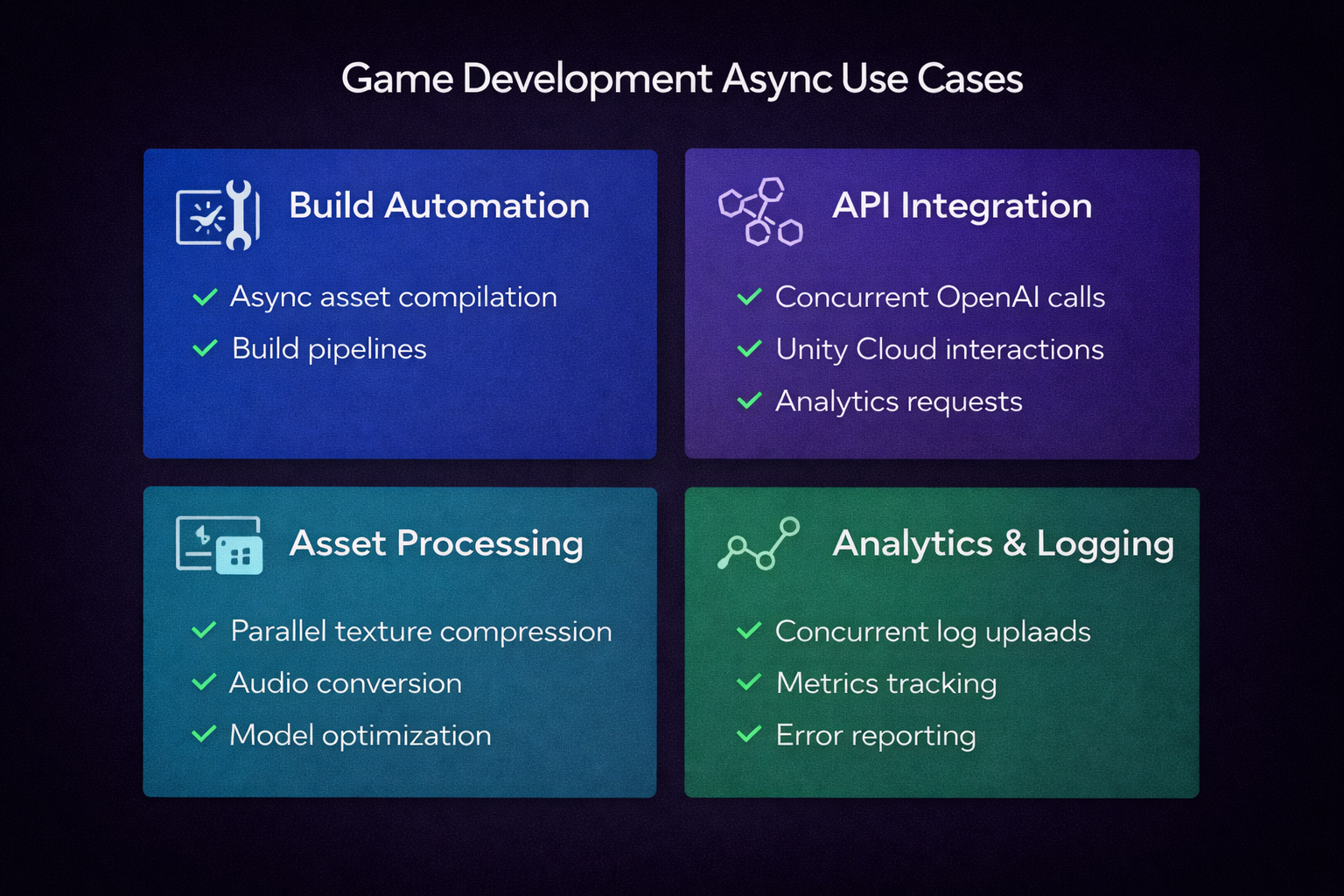
1. AI Integration Tools
When building AI-powered game features, you often need:
- Multiple AI provider responses for comparison
- Parallel moderation checks
- Concurrent translation to multiple languages
- Simultaneous content generation and validation
Example: An NPC dialogue generator that queries ChatGPT, Claude, and Gemini simultaneously, then picks the best response.
2. Build Automation
Unity build pipelines benefit from async:
- Analyze multiple platform build outputs concurrently
- Upload to multiple distribution platforms in parallel
- Send notifications while uploads are in progress
- Process build artifacts (logs, reports) simultaneously
Example: A build tool that uploads WebGL to FTP, Android to Google Play, and iOS to TestFlight. All at the same time.
3. Asset Processing
Game asset pipelines involve heavy I/O:
- Convert multiple audio files to different formats
- Generate texture mipmaps for many images
- Process 3D models in a batch
- Validate asset integrity across a project
Example: A tool that validates 1000 asset files in seconds instead of minutes.
4. Log Analysis
Debugging and analytics require processing many files:
- Parse build logs from multiple platforms
- Analyze crash reports from thousands of players
- Aggregate performance metrics from test runs
- Search log files for error patterns
Example: A debugging tool that searches 50 log files simultaneously for specific error patterns.
When NOT to Use Async
- CPU-intensive operations - Use multiprocessing instead
- Simple scripts that run once
- Operations that must be strictly sequential
- When code complexity outweighs performance gains
So What’s the Actual Benefit?
Async programming doesn’t make individual operations faster. It makes your tool more responsive and completes multiple operations in less total time.
Think of it like a restaurant: A chef who cooks one dish from start to finish before starting the next (sequential) serves fewer customers than a chef who starts multiple dishes and switches between them while things cook (concurrent).
The Problem: Sequential Operations
Let’s look at a real-world example: an AI response comparison tool for game developers building AI NPCs.
Sequential Approach (30 Seconds)
import requests
import time

def get_chatgpt_response(prompt: str) -> str:
    """Call ChatGPT API (blocks for ~10 seconds)"""
    response = requests.post(
        "https://api.openai.com/v1/chat/completions",
        headers={"Authorization": f"Bearer {OPENAI_API_KEY}"},
        json={
            "model": "gpt-4",
            "messages": [{"role": "user", "content": prompt}]
        }
    )
    return response.json()["choices"][0]["message"]["content"]

def get_claude_response(prompt: str) -> str:
    """Call Claude API (blocks for ~10 seconds)"""
    response = requests.post(
        "https://api.anthropic.com/v1/messages",
        headers={
            "x-api-key": ANTHROPIC_API_KEY,
            "anthropic-version": "2023-06-01"
        },
        json={
            "model": "claude-3-5-sonnet-20241022",
            "messages": [{"role": "user", "content": prompt}],
            "max_tokens": 1024
        }
    )
    return response.json()["content"][0]["text"]

def get_gemini_response(prompt: str) -> str:
    """Call Gemini API (blocks for ~10 seconds)"""
    response = requests.post(
        f"https://generativelanguage.googleapis.com/v1/models/gemini-2.0-flash:generateContent?key={GOOGLE_API_KEY}",
        json={"contents": [{"parts": [{"text": prompt}]}]}
    )
    return response.json()["candidates"][0]["content"]["parts"][0]["text"]

def compare_ai_responses(prompt: str) -> dict:
    """Get responses from all three providers SEQUENTIALLY"""
    print("Starting AI comparison...")
    start = time.time()

    # These run ONE AT A TIME
    chatgpt = get_chatgpt_response(prompt)  # Wait 10 seconds
    print(f"ChatGPT done after {time.time() - start:.1f}s")

    claude = get_claude_response(prompt)    # Wait another 10 seconds
    print(f"Claude done after {time.time() - start:.1f}s")

    gemini = get_gemini_response(prompt)    # Wait another 10 seconds
    print(f"Gemini done after {time.time() - start:.1f}s")

    total_time = time.time() - start
    print(f"Total time: {total_time:.1f}s")  # ~30 seconds!

    return {
        "chatgpt": chatgpt,
        "claude": claude,
        "gemini": gemini,
        "total_time": total_time
    }

# Usage
result = compare_ai_responses("What is the meaning of life?")
# Output:
# Starting AI comparison...
# ChatGPT done after 10.2s
# Claude done after 20.5s
# Gemini done after 30.1s
# Total time: 30.1s
The Problem
Each API call blocks while waiting for the response. The program sits idle for 30 seconds, even though most of that time is spent waiting for network I/O, not actually computing anything.
Visual Timeline:
Sequential (30 seconds total):
[ChatGPT=========>] [Claude=========>] [Gemini=========>]
0s               10s               20s               30s

Concurrent (10 seconds total):
[ChatGPT=========>]
[Claude=========>]
[Gemini=========>]
0s               10s
This is the core problem async solves: Instead of waiting for each operation to finish before starting the next, we start all three and let them run concurrently.
Async Basics: async/await Explained
Core Concept 1: Coroutines
Functions defined with async def are coroutines. They don’t execute immediately when called. Instead, they return a coroutine object that can be awaited.
# Regular synchronous function
def regular_function():
    return "I run immediately"

result = regular_function()  # Executes now
print(result)  # "I run immediately"

# Async coroutine
async def async_function():
    return "I return a coroutine"

coro = async_function()  # Doesn't execute! Returns coroutine object
print(coro)  # <coroutine object async_function at 0x...>

# Must be awaited
import asyncio
result = asyncio.run(async_function())  # Now it executes
print(result)  # "I return a coroutine"
Core Concept 2: The await Keyword
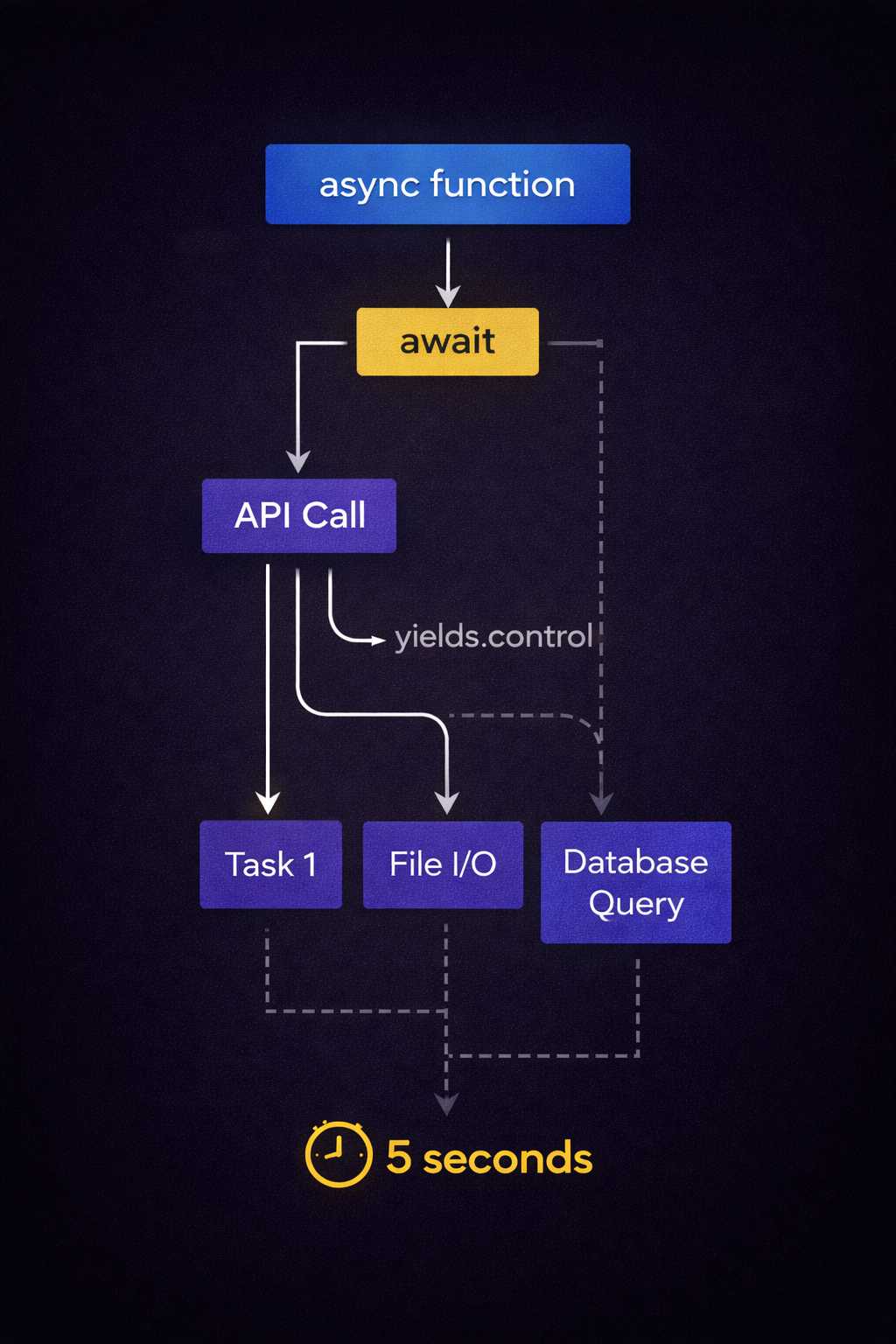
await pauses the coroutine until the awaited operation completes. During this pause, the event loop can run other coroutines.
import asyncio

async def fetch_data(delay: int, name: str) -> str:
    """Simulate API call with delay"""
    print(f"{name}: Starting (will take {delay}s)")
    await asyncio.sleep(delay)  # Pause here, let other code run
    print(f"{name}: Finished")
    return f"Data from {name}"

async def main():
    # Sequential: total 5 seconds
    data1 = await fetch_data(3, "API 1")  # Wait 3 seconds
    data2 = await fetch_data(2, "API 2")  # Wait 2 more seconds
    print(f"Sequential total: {data1}, {data2}")

asyncio.run(main())

# Output:
# API 1: Starting (will take 3s)
# API 1: Finished
# API 2: Starting (will take 2s)
# API 2: Finished
# Sequential total: Data from API 1, Data from API 2
Core Concept 3: The Event Loop
The event loop manages coroutine execution. It runs one coroutine until it hits await, then switches to another coroutine, and so on.
# Event loop automatically managed by asyncio.run()
asyncio.run(main())

# Equivalent to:
loop = asyncio.get_event_loop()
try:
    loop.run_until_complete(main())
finally:
    loop.close()
Key Rules
async defcreates a coroutine functionawaitcan only be used insideasync deffunctions- Regular functions cannot await (would need to be marked
async) - Top-level execution needs
asyncio.run()or an event loop
Common Mistake
async def my_coroutine():
    return "result"

# WRONG: Calling without await or asyncio.run
result = my_coroutine()  # Returns coroutine object, not "result"

# RIGHT: Using asyncio.run
result = asyncio.run(my_coroutine())  # Returns "result"

# OR: Using await inside another async function
async def caller():
    result = await my_coroutine()  # Returns "result"
    return result
Understanding these three concepts (coroutines, await, and the event loop) is the foundation. Everything else in async programming builds on them.
Running Operations Concurrently
Now let’s make those AI API calls run concurrently. The key is asyncio.gather().
Concurrent Approach (10 Seconds)
import asyncio
import aiohttp  # Async HTTP library
import time

async def get_chatgpt_response_async(prompt: str) -> str:
    """Async version using aiohttp"""
    async with aiohttp.ClientSession() as session:
        async with session.post(
            "https://api.openai.com/v1/chat/completions",
            headers={"Authorization": f"Bearer {OPENAI_API_KEY}"},
            json={
                "model": "gpt-4",
                "messages": [{"role": "user", "content": prompt}]
            }
        ) as response:
            data = await response.json()
            return data["choices"][0]["message"]["content"]

async def get_claude_response_async(prompt: str) -> str:
    """Async Claude API call"""
    async with aiohttp.ClientSession() as session:
        async with session.post(
            "https://api.anthropic.com/v1/messages",
            headers={
                "x-api-key": ANTHROPIC_API_KEY,
                "anthropic-version": "2023-06-01"
            },
            json={
                "model": "claude-3-5-sonnet-20241022",
                "messages": [{"role": "user", "content": prompt}],
                "max_tokens": 1024
            }
        ) as response:
            data = await response.json()
            return data["content"][0]["text"]

async def get_gemini_response_async(prompt: str) -> str:
    """Async Gemini API call"""
    async with aiohttp.ClientSession() as session:
        async with session.post(
            f"https://generativelanguage.googleapis.com/v1/models/gemini-2.0-flash:generateContent?key={GOOGLE_API_KEY}",
            json={"contents": [{"parts": [{"text": prompt}]}]}
        ) as response:
            data = await response.json()
            return data["candidates"][0]["content"]["parts"][0]["text"]

async def compare_ai_responses_concurrent(prompt: str) -> dict:
    """Get responses from all three providers CONCURRENTLY"""
    print("Starting concurrent AI comparison...")
    start = time.time()

    # Start all three at once with asyncio.gather()
    chatgpt, claude, gemini = await asyncio.gather(
        get_chatgpt_response_async(prompt),
        get_claude_response_async(prompt),
        get_gemini_response_async(prompt)
    )

    total_time = time.time() - start
    print(f"Concurrent total time: {total_time:.1f}s")  # ~10 seconds!

    return {
        "chatgpt": chatgpt,
        "claude": claude,
        "gemini": gemini,
        "total_time": total_time
    }

# Usage
result = asyncio.run(compare_ai_responses_concurrent("What is the meaning of life?"))
# Output:
# Starting concurrent AI comparison...
# Concurrent total time: 10.2s  # 3x faster!
How asyncio.gather() Works
# gather() takes multiple coroutines and runs them concurrently
results = await asyncio.gather(
    coroutine1(),
    coroutine2(),
    coroutine3()
)
# results is a list: [result1, result2, result3]
Alternative: asyncio.create_task()
For more control, use create_task():
async def compare_with_tasks(prompt: str) -> dict:
    """Using create_task for more control"""
    # Create tasks (starts execution immediately)
    task1 = asyncio.create_task(get_chatgpt_response_async(prompt))
    task2 = asyncio.create_task(get_claude_response_async(prompt))
    task3 = asyncio.create_task(get_gemini_response_async(prompt))

    # Wait for all to complete
    chatgpt = await task1
    claude = await task2
    gemini = await task3

    return {"chatgpt": chatgpt, "claude": claude, "gemini": gemini}
When to Use Each
asyncio.gather() - Simple concurrent execution
# Best for: Run all, wait for all
results = await asyncio.gather(task1(), task2(), task3())
asyncio.create_task() - More control over execution
# Best for: Start tasks, do other work, then wait
task = asyncio.create_task(long_operation())
do_other_work()  # This runs while task executes
result = await task  # Wait for completion when needed
asyncio.wait() - Advanced control with timeouts
# Best for: Wait with timeout, get partial results
done, pending = await asyncio.wait(
    [task1(), task2(), task3()],
    timeout=5.0,
    return_when=asyncio.FIRST_COMPLETED  # or ALL_COMPLETED
)
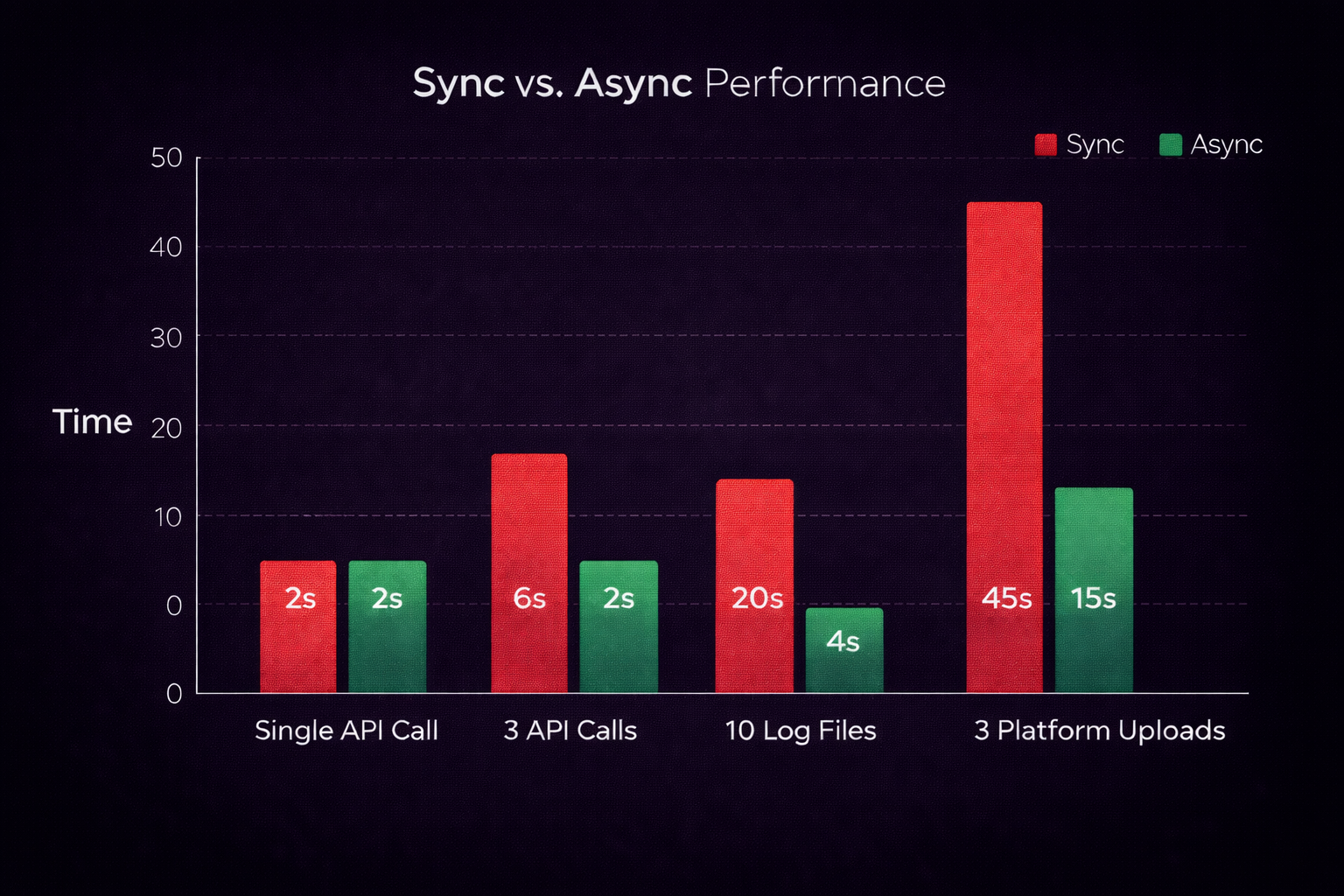
Performance Comparison
# Sequential: 30 seconds total
result = sequential_api_calls()

# Concurrent: 10 seconds total (3x faster!)
result = await concurrent_api_calls()
Error Handling in Async Code
Basic Try/Except
async def safe_api_call(prompt: str) -> dict:
    """API call with error handling"""
    try:
        response = await get_chatgpt_response_async(prompt)
        return {"success": True, "response": response}
    except aiohttp.ClientError as e:
        return {"success": False, "error": f"Network error: {e}"}
    except Exception as e:
        return {"success": False, "error": f"Unexpected error: {e}"}
Handling Timeouts
import asyncio

async def api_call_with_timeout(prompt: str, timeout: float = 10.0) -> str:
    """API call with timeout"""
    try:
        # Wait up to 10 seconds, then raise TimeoutError
        response = await asyncio.wait_for(
            get_chatgpt_response_async(prompt),
            timeout=timeout
        )
        return response
    except asyncio.TimeoutError:
        return "Error: API call timed out after 10 seconds"
    except Exception as e:
        return f"Error: {e}"

# Usage
result = await api_call_with_timeout("Prompt", timeout=5.0)
Partial Failures with gather()
By default, gather() stops on first exception. Use return_exceptions=True to get partial results:
async def get_all_responses_with_errors(prompt: str) -> dict:
    """Get responses even if some fail"""
    results = await asyncio.gather(
        get_chatgpt_response_async(prompt),
        get_claude_response_async(prompt),
        get_gemini_response_async(prompt),
        return_exceptions=True  # Don't stop on errors
    )

    # Check results
    responses = {}
    for name, result in zip(["chatgpt", "claude", "gemini"], results):
        if isinstance(result, Exception):
            responses[name] = f"Error: {result}"
        else:
            responses[name] = result

    return responses

# Usage
responses = await get_all_responses_with_errors("Prompt")
# Even if one fails, others still complete
Retry Logic
async def retry_api_call(
    prompt: str,
    max_retries: int = 3,
    delay: float = 1.0
) -> str:
    """Retry failed API calls"""
    for attempt in range(max_retries):
        try:
            return await get_chatgpt_response_async(prompt)
        except Exception as e:
            if attempt == max_retries - 1:
                raise  # Last attempt, give up
            print(f"Attempt {attempt + 1} failed: {e}. Retrying in {delay}s...")
            await asyncio.sleep(delay)
            delay *= 2  # Exponential backoff

# Usage
try:
    result = await retry_api_call("Prompt", max_retries=3)
except Exception as e:
    print(f"All retries failed: {e}")
Practical Example: AI Response Aggregator
This tool queries multiple AI providers, compares responses, and picks the best one based on criteria.
import asyncio
import aiohttp
import time
from dataclasses import dataclass
from typing import Optional

@dataclass
class AIResponse:
    provider: str
    response: str
    response_time: float
    success: bool
    error: Optional[str] = None

class AIResponseAggregator:
    """Compare responses from multiple AI providers concurrently"""

    def __init__(
        self,
        openai_key: str,
        anthropic_key: str,
        google_key: str
    ):
        self.openai_key = openai_key
        self.anthropic_key = anthropic_key
        self.google_key = google_key

    async def query_chatgpt(self, prompt: str) -> AIResponse:
        """Query ChatGPT with timing"""
        start = time.time()
        try:
            async with aiohttp.ClientSession() as session:
                async with session.post(
                    "https://api.openai.com/v1/chat/completions",
                    headers={"Authorization": f"Bearer {self.openai_key}"},
                    json={
                        "model": "gpt-4",
                        "messages": [{"role": "user", "content": prompt}]
                    },
                    timeout=aiohttp.ClientTimeout(total=15)
                ) as response:
                    data = await response.json()
                    return AIResponse(
                        provider="ChatGPT",
                        response=data["choices"][0]["message"]["content"],
                        response_time=time.time() - start,
                        success=True
                    )
        except Exception as e:
            return AIResponse(
                provider="ChatGPT",
                response="",
                response_time=time.time() - start,
                success=False,
                error=str(e)
            )

    async def query_claude(self, prompt: str) -> AIResponse:
        """Query Claude with timing"""
        start = time.time()
        try:
            async with aiohttp.ClientSession() as session:
                async with session.post(
                    "https://api.anthropic.com/v1/messages",
                    headers={
                        "x-api-key": self.anthropic_key,
                        "anthropic-version": "2023-06-01"
                    },
                    json={
                        "model": "claude-3-5-sonnet-20241022",
                        "messages": [{"role": "user", "content": prompt}],
                        "max_tokens": 1024
                    },
                    timeout=aiohttp.ClientTimeout(total=15)
                ) as response:
                    data = await response.json()
                    return AIResponse(
                        provider="Claude",
                        response=data["content"][0]["text"],
                        response_time=time.time() - start,
                        success=True
                    )
        except Exception as e:
            return AIResponse(
                provider="Claude",
                response="",
                response_time=time.time() - start,
                success=False,
                error=str(e)
            )

    async def query_gemini(self, prompt: str) -> AIResponse:
        """Query Gemini with timing"""
        start = time.time()
        try:
            async with aiohttp.ClientSession() as session:
                async with session.post(
                    f"https://generativelanguage.googleapis.com/v1/models/gemini-2.0-flash:generateContent?key={self.google_key}",
                    json={"contents": [{"parts": [{"text": prompt}]}]},
                    timeout=aiohttp.ClientTimeout(total=15)
                ) as response:
                    data = await response.json()
                    return AIResponse(
                        provider="Gemini",
                        response=data["candidates"][0]["content"]["parts"][0]["text"],
                        response_time=time.time() - start,
                        success=True
                    )
        except Exception as e:
            return AIResponse(
                provider="Gemini",
                response="",
                response_time=time.time() - start,
                success=False,
                error=str(e)
            )

    async def get_best_response(self, prompt: str) -> AIResponse:
        """Query all providers and return best response"""
        print(f"Querying all AI providers concurrently...")
        start = time.time()

        # Run all queries concurrently
        responses = await asyncio.gather(
            self.query_chatgpt(prompt),
            self.query_claude(prompt),
            self.query_gemini(prompt),
            return_exceptions=True
        )

        total_time = time.time() - start
        print(f"All queries completed in {total_time:.2f}s")

        # Filter successful responses
        successful = [r for r in responses if r.success]

        if not successful:
            print("All providers failed!")
            return responses[0]  # Return first error

        # Pick fastest successful response
        best = min(successful, key=lambda r: r.response_time)
        print(f"Best response from {best.provider} ({best.response_time:.2f}s)")

        return best

# Usage
async def main():
    aggregator = AIResponseAggregator(
        openai_key="your-openai-key",
        anthropic_key="your-anthropic-key",
        google_key="your-google-key"
    )

    best = await aggregator.get_best_response(
        "Write a short greeting for a fantasy merchant NPC"
    )

    print(f"\nBest response from {best.provider}:")
    print(best.response)

if __name__ == "__main__":
    asyncio.run(main())
Output:
Querying all AI providers concurrently...
All queries completed in 8.73s
Best response from Gemini (8.21s)

Best response from Gemini:
"Greetings, traveler! Welcome to my humble shop..."
Practical Example: Async File Processing
Use Case: Process Multiple Build Logs
import asyncio
import aiofiles  # Async file I/O
from pathlib import Path
from typing import List, Dict
import re

async def analyze_build_log(log_path: Path) -> Dict:
    """Analyze single build log asynchronously"""
    print(f"Analyzing {log_path.name}...")

    async with aiofiles.open(log_path, 'r') as f:
        content = await f.read()

    # Analyze log content
    lines = content.split('\n')
    errors = [line for line in lines if 'error' in line.lower()]
    warnings = [line for line in lines if 'warning' in line.lower()]
    build_time = extract_build_time(content)

    return {
        "platform": log_path.stem,
        "total_lines": len(lines),
        "errors": len(errors),
        "warnings": len(warnings),
        "build_time": build_time,
        "error_details": errors[:5]  # First 5 errors
    }

def extract_build_time(content: str) -> float:
    """Extract build time from log"""
    match = re.search(r'Build completed in (\d+\.?\d*) seconds', content)
    return float(match.group(1)) if match else 0.0

async def analyze_all_logs(log_dir: Path) -> List[Dict]:
    """Analyze all build logs concurrently"""
    log_files = list(log_dir.glob("*.log"))

    if not log_files:
        print(f"No log files found in {log_dir}")
        return []

    print(f"Found {len(log_files)} log files")
    print(f"Analyzing concurrently...")

    # Process all logs at once
    results = await asyncio.gather(
        *[analyze_build_log(log) for log in log_files],
        return_exceptions=True
    )

    # Filter out errors
    valid_results = [r for r in results if not isinstance(r, Exception)]

    return valid_results

async def generate_build_report(log_dir: Path):
    """Generate report from all build logs"""
    results = await analyze_all_logs(log_dir)

    print("\n" + "="*50)
    print("BUILD ANALYSIS REPORT")
    print("="*50)

    total_errors = sum(r["errors"] for r in results)
    total_warnings = sum(r["warnings"] for r in results)

    for result in results:
        print(f"\n{result['platform'].upper()}:")
        print(f"  Build Time: {result['build_time']:.1f}s")
        print(f"  Errors: {result['errors']}")
        print(f"  Warnings: {result['warnings']}")

        if result['error_details']:
            print(f"  First Error: {result['error_details'][0][:80]}...")

    print(f"\nTOTAL ERRORS: {total_errors}")
    print(f"\nTOTAL WARNINGS: {total_warnings}")

# Usage
if __name__ == "__main__":
    log_directory = Path("Builds/logs")
    asyncio.run(generate_build_report(log_directory))
Performance:
# Sequential: 5 logs × 2 seconds each = 10 seconds
# Concurrent: All 5 logs in ~2 seconds (5x faster!)
Practical Example: Parallel Build Analysis
Use Case: Analyze Multiple Unity Builds
import asyncio
import aiofiles
from pathlib import Path
from typing import Dict
import json

async def analyze_build_size(build_path: Path) -> Dict:
    """Analyze build size and structure"""
    total_size = 0
    file_count = 0
    largest_files = []

    for file_path in build_path.rglob('*'):
        if file_path.is_file():
            size = file_path.stat().st_size
            total_size += size
            file_count += 1
            largest_files.append((file_path.name, size))

    # Sort by size, keep top 5
    largest_files.sort(key=lambda x: x[1], reverse=True)

    return {
        "platform": build_path.name,
        "total_size_mb": total_size / (1024 * 1024),
        "file_count": file_count,
        "largest_files": largest_files[:5]
    }

async def analyze_build_dependencies(build_path: Path) -> Dict:
    """Analyze build dependencies from manifest"""
    manifest_path = build_path / "manifest.json"

    if not manifest_path.exists():
        return {"dependencies": [], "engine_version": "unknown"}

    async with aiofiles.open(manifest_path, 'r') as f:
        content = await f.read()
        data = json.loads(content)

    return {
        "dependencies": data.get("dependencies", []),
        "engine_version": data.get("unityVersion", "unknown")
    }

async def full_build_analysis(build_path: Path) -> Dict:
    """Complete build analysis"""
    print(f"Analyzing {build_path.name}...")

    # Run multiple analyses concurrently
    size_info, dep_info = await asyncio.gather(
        analyze_build_size(build_path),
        analyze_build_dependencies(build_path)
    )

    return {**size_info, **dep_info}

async def analyze_all_builds(builds_dir: Path):
    """Analyze all platform builds"""
    build_dirs = [d for d in builds_dir.iterdir() if d.is_dir()]

    print(f"Found {len(build_dirs)} builds")

    # Analyze all builds concurrently
    results = await asyncio.gather(
        *[full_build_analysis(d) for d in build_dirs]
    )

    # Generate report
    print("\n" + "="*60)
    print("BUILD SIZE ANALYSIS")
    print("="*60)

    for result in sorted(results, key=lambda x: x['total_size_mb'], reverse=True):
        print(f"\n{result['platform'].upper()}:")
        print(f"  Total Size: {result['total_size_mb']:.1f} MB")
        print(f"  File Count: {result['file_count']}")
        print(f"  Engine: {result['engine_version']}")
        if result['largest_files']:
            print(f"  Largest File: {result['largest_files'][0][0]} "
                  f"({result['largest_files'][0][1] / (1024*1024):.1f} MB)")

# Usage
asyncio.run(analyze_all_builds(Path("Builds")))
Testing Async Functions
Using pytest-asyncio
# test_async_tools.py
import pytest
import asyncio

# Mark test as async
@pytest.mark.asyncio
async def test_api_call():
    """Test async API call"""
    result = await get_chatgpt_response_async("Test prompt")
    assert isinstance(result, str)
    assert len(result) > 0

@pytest.mark.asyncio
async def test_concurrent_calls():
    """Test concurrent execution"""
    import time
    start = time.time()

    results = await asyncio.gather(
        asyncio.sleep(1),
        asyncio.sleep(1),
        asyncio.sleep(1)
    )

    duration = time.time() - start
    # Should complete in ~1 second (concurrent), not 3 (sequential)
    assert duration < 1.5

@pytest.mark.asyncio
async def test_error_handling():
    """Test error handling"""
    with pytest.raises(asyncio.TimeoutError):
        await asyncio.wait_for(
            asyncio.sleep(10),
            timeout=1.0
        )

@pytest.mark.asyncio
async def test_partial_failures():
    """Test handling partial failures"""
    async def failing_task():
        raise ValueError("Intentional error")

    async def succeeding_task():
        return "Success"

    results = await asyncio.gather(
        failing_task(),
        succeeding_task(),
        return_exceptions=True
    )

    assert isinstance(results[0], ValueError)
    assert results[1] == "Success"
Running Tests
pip install pytest pytest-asyncio
pytest test_async_tools.py -v
Testing Tips
- Use
@pytest.mark.asynciofor async tests - Test both success and failure cases
- Verify concurrent execution (check timing)
- Test timeout behavior
- Mock external API calls for faster tests
Common Pitfalls and Solutions
Pitfall 1: Forgetting await
# WRONG: Coroutine object, not result
async def wrong():
    result = async_function()  # Forgot await!
    print(result)  # <coroutine object...>

# RIGHT: Await the coroutine
async def correct():
    result = await async_function()
    print(result)  # Actual result
Pitfall 2: Calling async from sync code
# WRONG: Can't await in sync function
def sync_function():
    result = await async_function()  # SyntaxError!

# RIGHT: Use asyncio.run
def sync_function():
    result = asyncio.run(async_function())

# OR: Make function async
async def async_function_wrapper():
    result = await other_async_function()
Pitfall 3: Blocking the event loop
# WRONG: Blocks event loop
async def bad():
    time.sleep(10)  # Blocks entire loop!
    return "Done"

# RIGHT: Use async sleep
async def good():
    await asyncio.sleep(10)  # Lets other tasks run
    return "Done"
Pitfall 4: Creating tasks but not awaiting them
# WRONG: Tasks created but never completed
async def fire_and_forget_wrong():
    asyncio.create_task(background_task())
    return "Done"  # Task might not finish!

# RIGHT: Await task completion
async def fire_and_forget_right():
    task = asyncio.create_task(background_task())
    await task  # Ensure completion
    return "Done"
Pitfall 5: Sharing state between coroutines
# DANGEROUS: Race condition
counter = 0

async def increment():
    global counter
    temp = counter
    await asyncio.sleep(0)  # Context switch!
    counter = temp + 1  # Race condition

# SAFE: Use locks
lock = asyncio.Lock()

async def increment_safe():
    global counter
    async with lock:
        temp = counter
        await asyncio.sleep(0)
        counter = temp + 1
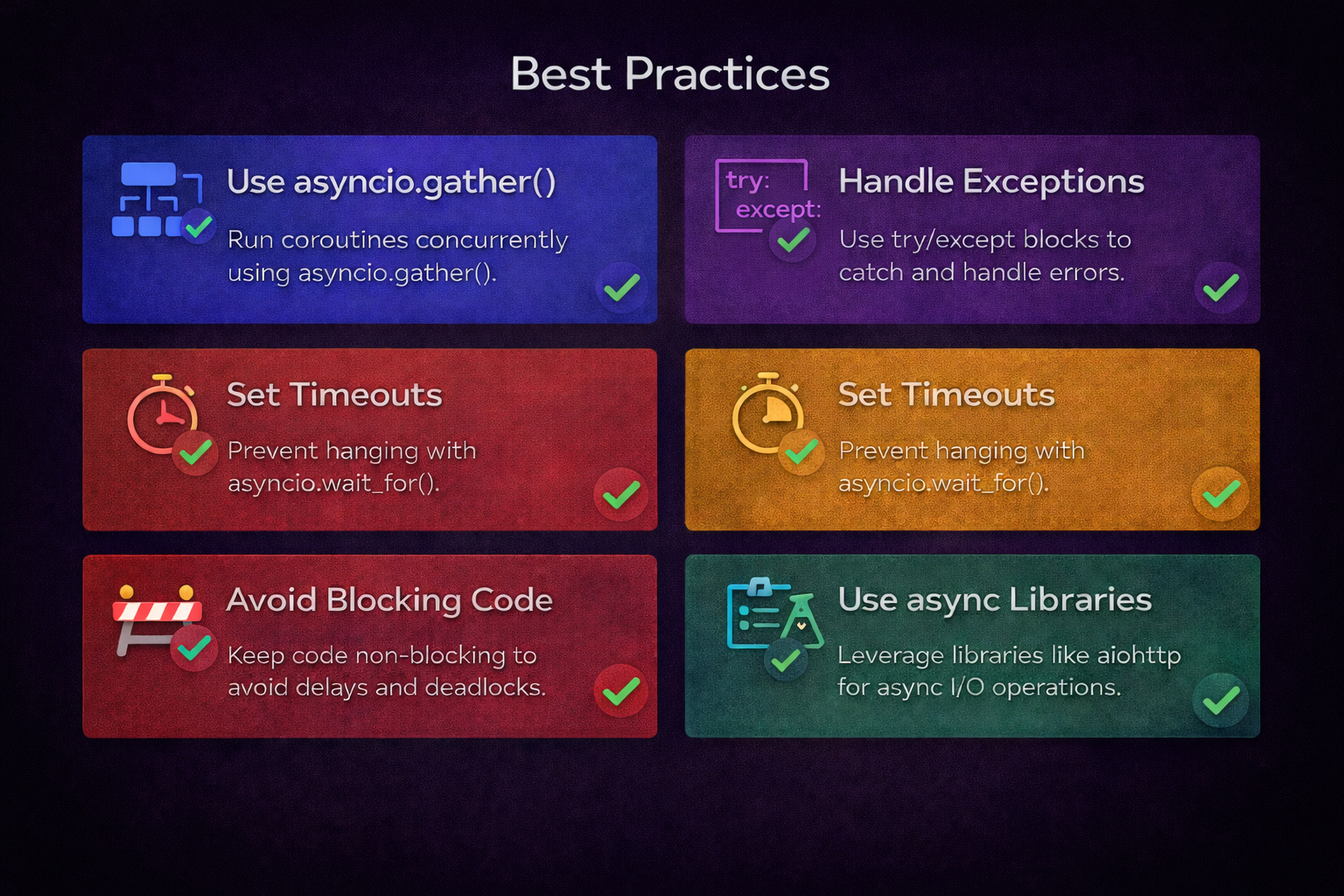
Best Practices
- Always await coroutines - Don’t forget the
awaitkeyword - Use asyncio.run() for top-level execution - Clean entry point for async code
- Never use time.sleep() in async code - Use
await asyncio.sleep()instead - Await all created tasks - Ensure background tasks are complete
- Use locks for shared state - Prevent race conditions
- Handle errors with try/except - Network operations can fail
- Set timeouts for network operations - Prevent hanging forever
- Test async code thoroughly - Timing issues can be subtle
What You’ve Learned
You now understand async programming in Python for game development tools:
- async/await fundamentals - Coroutines, event loops, and concurrency
- Running operations concurrently - asyncio.gather() and create_task()
- Error handling - Timeouts, retries, and partial failures
- AI API integration - Concurrent calls to multiple providers
- File processing - Parallel log analysis and build inspection
- Testing - pytest-asyncio for async code
- Common pitfalls - What to avoid and how to fix mistakes
Here’s the thing: async programming doesn’t make individual operations faster. It makes your tools more responsive by running multiple operations at once, turning 30-second waits into 10-second results.
Next Steps
Now that you understand async programming, apply it to your game development tools:
- Identify I/O bottlenecks - Find sequential operations that could run concurrently
- Start small - Convert one tool or script to async
- Measure improvements - Track before/after performance
- Expand gradually - Add async to more tools as you gain confidence
Related Reading:
- Python for Unity Build Automation - Build automation fundamentals
- Unity Build Automation Part 2 - Async deployment examples
- How to Add AI Chat to Unity - AI integration context
- Debugging AI NPCs - Real-world tool usage
Ready to build faster, more responsive game development tools? Start with async API calls or file processing. The patterns in this guide work for any I/O-heavy operation in your development workflow.
Got questions about async programming? Found a clever use case? We’d love to hear how you’re using async in game development. Drop us a line at studio.angry.shark@gmail.com.

About Angry Shark Studio
Angry Shark Studio is a professional Unity AR/VR development studio specializing in mobile multiplatform applications and AI solutions. Our team includes Unity Certified Expert Programmers with extensive experience in AR/VR development.
Related Articles
More Articles
Explore more insights on Unity AR/VR development, mobile apps, and emerging technologies.
View All Articles